<?xml version="1.0" encoding="utf-8"?><feed xmlns="http://www.w3.org/2005/Atom" ><generator uri="https://jekyllrb.com/" version="4.4.1">Jekyll</generator><link href="https://www.mslinn.com/feed/django.xml" rel="self" type="application/atom+xml" /><link href="https://www.mslinn.com/" rel="alternate" type="text/html" /><updated>2026-06-09T10:22:45-04:00</updated><id>https://www.mslinn.com/feed/django.xml</id><title type="html">Mike Slinn | Django</title><author><name>Mike Slinn</name></author><entry><title type="html">Django / PyTest Setup and Rationale</title><link href="https://www.mslinn.com/django/3300-django-pytest.html" rel="alternate" type="text/html" title="Django / PyTest Setup and Rationale" /><published>2021-06-08T00:00:00-04:00</published><updated>2021-06-08T00:00:00-04:00</updated><id>https://www.mslinn.com/django/3300-django-pytest</id><content type="html" xml:base="https://www.mslinn.com/django/3300-django-pytest.html"><![CDATA[<!-- #region intro -->
<p>
  In an <a href='/django/2500-django-tests.html'>earlier article</a> I discussed a simple setup for Django unit testing in general,
  using <code>unittest</code>,
  which requires tests to be written using classes.
  Unfortunately, the official Django documentation for <code>unittest</code> does not mention fixtures by name.
  Instead, the docs contain a poorly written description of how to use <code>manage.py</code>&rsquo;s
  <code>dumpdata</code> and <code>loaddata</code> commands to manage test data.
  I found the class-based approach imposed by <code>unittest</code> to be limiting because it is incompatible with using programmatically-generated fixtures.
</p>
<!-- endregion -->


<!-- #region PyTest -->
<h2 id="pytest">PyTest</h2>
<p>
  This article focuses on unit testing using <a href='https://docs.pytest.org/en/stable/contents.html' target='_blank' rel="nofollow">PyTest</a>,
  which could be described as a loose superset of <code>unittest</code> that has strong support for programmatically-generated fixtures.
  PyTest does not need tests to be arranged in classes, nor are test classes supported.
  I actually installed <a href='https://pytest-django.readthedocs.io/en/latest/index.html' target='_blank' rel="nofollow">pytest-django</a> because it integrates PyTest with Django.
</p>
<div class="jekyll_pre" >
<div class='codeLabel unselectable' data-lt-active='false'>Shell</div>
<pre data-lt-active='false' class='maxOneScreenHigh copyContainer' id='id34cbf59b4564'><button class='copyBtn' data-clipboard-target='#id34cbf59b4564' title='Copy to clipboard'><img src='/assets/images/clippy.svg' alt='Copy to clipboard' style='width: 13px'></button><span class='unselectable'>(aw) $ </span>pip install pytest-django</pre>

</div>


<p>
  Below is the <code>pytest</code> help message.
  It is difficult to read, and would benefit from copy editing and formatting:
</p>

<!-- #region -->
<div class="jekyll_pre" >
<div class='codeLabel unselectable' data-lt-active='false'>Shell</div>
<pre data-lt-active='false' class='maxOneScreenHigh copyContainer' id='id314b625e22dc'><button class='copyBtn' data-clipboard-target='#id314b625e22dc' title='Copy to clipboard'><img src='/assets/images/clippy.svg' alt='Copy to clipboard' style='width: 13px'></button><span class='unselectable'>(aw) $ </span>pytest -h
<span class='unselectable'>usage: pytest [options] [file_or_dir] [file_or_dir] [...]<br/>
positional arguments:
file_or_dir<br/>
general:
-k EXPRESSION         only run tests which match the given substring
expression. An expression is a python evaluatable
expression where all names are substring-matched against
test names and their parent classes. Example: -k
&#39;test_method or test_other&#39; matches all test functions
and classes whose name contains &#39;test_method&#39; or
&#39;test_other&#39;, while -k &#39;not test_method&#39; matches those
that don&#39;t contain &#39;test_method&#39; in their names. -k &#39;not
test_method and not test_other&#39; will eliminate the
matches. Additionally keywords are matched to classes
and functions containing extra names in their
&#39;extra_keyword_matches&#39; set, as well as functions which
have names assigned directly to them. The matching is
case-insensitive.
-m MARKEXPR           only run tests matching given mark expression.
For example: -m &#39;mark1 and not mark2&#39;.
--markers             show markers (builtin, plugin and per-project ones).
-x, --exitfirst       exit instantly on first error or failed test.
--fixtures, --funcargs
show available fixtures, sorted by plugin appearance
(fixtures with leading &#39;_&#39; are only shown with &#39;-v&#39;)
--fixtures-per-test   show fixtures per test
--pdb                 start the interactive Python debugger on errors or
KeyboardInterrupt.
--pdbcls=modulename:classname
start a custom interactive Python debugger on errors.
For example:
--pdbcls=IPython.terminal.debugger:TerminalPdb
--trace               Immediately break when running each test.
--capture=method      per-test capturing method: one of fd|sys|no|tee-sys.
-s                    shortcut for --capture=no.
--runxfail            report the results of xfail tests as if they were not
marked
--lf, --last-failed   rerun only the tests that failed at the last run (or all
if none failed)
--ff, --failed-first  run all tests, but run the last failures first.
This may re-order tests and thus lead to repeated
fixture setup/teardown.
--nf, --new-first     run tests from new files first, then the rest of the
tests sorted by file mtime
--cache-show=[CACHESHOW]
show cache contents, don&#39;t perform collection or tests.
Optional argument: glob (default: &#39;*&#39;).
--cache-clear         remove all cache contents at start of test run.
--lfnf={all,none}, --last-failed-no-failures={all,none}
which tests to run with no previously (known) failures.
--sw, --stepwise      exit on test failure and continue from last failing test
next time
--sw-skip, --stepwise-skip
ignore the first failing test but stop on the next
failing test<br/>
reporting:
--durations=N         show N slowest setup/test durations (N=0 for all).
--durations-min=N     Minimal duration in seconds for inclusion in slowest
list. Default 0.005
-v, --verbose         increase verbosity.
--no-header           disable header
--no-summary          disable summary
-q, --quiet           decrease verbosity.
--verbosity=VERBOSE   set verbosity. Default is 0.
-r chars              show extra test summary info as specified by chars:
(f)ailed, (E)rror, (s)kipped, (x)failed, (X)passed,
(p)assed, (P)assed with output, (a)ll except passed
(p/P), or (A)ll. (w)arnings are enabled by default (see
--disable-warnings), &#39;N&#39; can be used to reset the list.
(default: &#39;fE&#39;).
--disable-warnings, --disable-pytest-warnings
disable warnings summary
-l, --showlocals      show locals in tracebacks (disabled by default).
--tb=style            traceback print mode (auto/long/short/line/native/no).
--show-capture={no,stdout,stderr,log,all}
Controls how captured stdout/stderr/log is shown on
failed tests. Default is &#39;all&#39;.
--full-trace          don&#39;t cut any tracebacks (default is to cut).
--color=color         color terminal output (yes/no/auto).
--code-highlight={yes,no}
Whether code should be highlighted (only if --color is
also enabled)
--pastebin=mode       send failed|all info to bpaste.net pastebin service.
--junit-xml=path      create junit-xml style report file at given path.
--junit-prefix=str    prepend prefix to classnames in junit-xml output<br/>
pytest-warnings:
-W PYTHONWARNINGS, --pythonwarnings=PYTHONWARNINGS
set which warnings to report, see -W option of python
itself.
--maxfail=num         exit after first num failures or errors.
--strict-config       any warnings encountered while parsing the `pytest`
section of the configuration file raise errors.
--strict-markers      markers not registered in the `markers` section of the
configuration file raise errors.
--strict              (deprecated) alias to --strict-markers.
-c file               load configuration from `file` instead of trying to
locate one of the implicit configuration files.
--continue-on-collection-errors
Force test execution even if collection errors occur.
--rootdir=ROOTDIR     Define root directory for tests. Can be relative path:
&#39;root_dir&#39;, &#39;./root_dir&#39;, &#39;root_dir/another_dir/&#39;;
absolute path: &#39;/home/user/root_dir&#39;; path with
variables: &#39;$HOME/root_dir&#39;.<br/>
collection:
--collect-only, --co  only collect tests, don&#39;t execute them.
--pyargs              try to interpret all arguments as python packages.
--ignore=path         ignore path during collection (multi-allowed).
--ignore-glob=path    ignore path pattern during collection (multi-allowed).
--deselect=nodeid_prefix
deselect item (via node id prefix) during collection
(multi-allowed).
--confcutdir=dir      only load conftest.py&#39;s relative to specified dir.
--noconftest          Don&#39;t load any conftest.py files.
--keep-duplicates     Keep duplicate tests.
--collect-in-virtualenv
Don&#39;t ignore tests in a local virtualenv directory
--import-mode={prepend,append,importlib}
prepend/append to sys.path when importing test modules
and conftest files, default is to prepend.
--doctest-modules     run doctests in all .py modules
--doctest-report={none,cdiff,ndiff,udiff,only_first_failure}
choose another output format for diffs on doctest
failure
--doctest-glob=pat    doctests file matching pattern, default: test*.txt
--doctest-ignore-import-errors
ignore doctest ImportErrors
--doctest-continue-on-failure
for a given doctest, continue to run after the first
failure<br/>
test session debugging and configuration:
--basetemp=dir        base temporary directory for this test run.(warning:
this directory is removed if it exists)
-V, --version         display pytest version and information about
plugins.When given twice, also display information about
plugins.
-h, --help            show help message and configuration info
-p name               early-load given plugin module name or entry point
(multi-allowed).
To avoid loading of plugins, use the `no:` prefix, e.g.
`no:doctest`.
--trace-config        trace considerations of conftest.py files.
--debug               store internal tracing debug information in
&#39;pytestdebug.log&#39;.
-o OVERRIDE_INI, --override-ini=OVERRIDE_INI
override ini option with &quot;option=value&quot; style, e.g. `-o
xfail_strict=True -o cache_dir=cache`.
--assert=MODE         Control assertion debugging tools.
&#39;plain&#39; performs no assertion debugging.
&#39;rewrite&#39; (the default) rewrites assert statements in
test modules on import to provide assert expression
information.
--setup-only          only setup fixtures, do not execute tests.
--setup-show          show setup of fixtures while executing tests.
--setup-plan          show what fixtures and tests would be executed but don&#39;t
execute anything.<br/>
logging:
--log-level=LEVEL     level of messages to catch/display.
Not set by default, so it depends on the root/parent log
handler&#39;s effective level, where it is &quot;WARNING&quot; by
default.
--log-format=LOG_FORMAT
log format as used by the logging module.
--log-date-format=LOG_DATE_FORMAT
log date format as used by the logging module.
--log-cli-level=LOG_CLI_LEVEL
cli logging level.
--log-cli-format=LOG_CLI_FORMAT
log format as used by the logging module.
--log-cli-date-format=LOG_CLI_DATE_FORMAT
log date format as used by the logging module.
--log-file=LOG_FILE   path to a file when logging will be written to.
--log-file-level=LOG_FILE_LEVEL
log file logging level.
--log-file-format=LOG_FILE_FORMAT
log format as used by the logging module.
--log-file-date-format=LOG_FILE_DATE_FORMAT
log date format as used by the logging module.
--log-auto-indent=LOG_AUTO_INDENT
Auto-indent multiline messages passed to the logging
module. Accepts true|on, false|off or an integer.<br/>
[pytest] ini-options in the first pytest.ini|tox.ini|setup.cfg file found:<br/>
markers (linelist):   markers for test functions
empty_parameter_set_mark (string):
default marker for empty parametersets
norecursedirs (args): directory patterns to avoid for recursion
testpaths (args):     directories to search for tests when no files or
directories are given in the command line.
filterwarnings (linelist):
Each line specifies a pattern for
warnings.filterwarnings. Processed after
-W/--pythonwarnings.
usefixtures (args):   list of default fixtures to be used with this project
python_files (args):  glob-style file patterns for Python test module
discovery
python_classes (args):
prefixes or glob names for Python test class discovery
python_functions (args):
prefixes or glob names for Python test function and
method discovery
disable_test_id_escaping_and_forfeit_all_rights_to_community_support (bool):
disable string escape non-ascii characters, might cause
unwanted side effects(use at your own risk)
console_output_style (string):
console output: &quot;classic&quot;, or with additional progress
information (&quot;progress&quot; (percentage) | &quot;count&quot;).
xfail_strict (bool):  default for the strict parameter of xfail markers when
not given explicitly (default: False)
enable_assertion_pass_hook (bool):
Enables the pytest_assertion_pass hook.Make sure to
delete any previously generated pyc cache files.
junit_suite_name (string):
Test suite name for JUnit report
junit_logging (string):
Write captured log messages to JUnit report: one of
no|log|system-out|system-err|out-err|all
junit_log_passing_tests (bool):
Capture log information for passing tests to JUnit
report:
junit_duration_report (string):
Duration time to report: one of total|call
junit_family (string):
Emit XML for schema: one of legacy|xunit1|xunit2
doctest_optionflags (args):
option flags for doctests
doctest_encoding (string):
encoding used for doctest files
cache_dir (string):   cache directory path.
log_level (string):   default value for --log-level
log_format (string):  default value for --log-format
log_date_format (string):
default value for --log-date-format
log_cli (bool):       enable log display during test run (also known as &quot;live
logging&quot;).
log_cli_level (string):
default value for --log-cli-level
log_cli_format (string):
default value for --log-cli-format
log_cli_date_format (string):
default value for --log-cli-date-format
log_file (string):    default value for --log-file
log_file_level (string):
default value for --log-file-level
log_file_format (string):
default value for --log-file-format
log_file_date_format (string):
default value for --log-file-date-format
log_auto_indent (string):
default value for --log-auto-indent
faulthandler_timeout (string):
Dump the traceback of all threads if a test takes more
than TIMEOUT seconds to finish.
addopts (args):       extra command line options
minversion (string):  minimally required pytest version
required_plugins (args):
plugins that must be present for pytest to run<br/>
environment variables:
PYTEST_ADDOPTS           extra command line options
PYTEST_PLUGINS           comma-separated plugins to load during startup
PYTEST_DISABLE_PLUGIN_AUTOLOAD set to disable plugin auto-loading
PYTEST_DEBUG             set to enable debug tracing of pytest&#39;s internals<br/><br/>
to see available markers type: pytest --markers
to see available fixtures type: pytest --fixtures
(shown according to specified file_or_dir or current dir if not specified; fixtures with leading &#39;_&#39; are only shown with the &#39;-v&#39; option </span></pre>

</div>

<!-- endregion -->

<p>
  I found that PyTest ran extremely slowly for my tests when accessing the database (66 seconds).
  Instead of taking seconds it took minutes to create a few simple fixtures.
  I installed <a href='https://pypi.org/project/pytest-timer/' target='_blank' rel="nofollow"><code>pytest-timer[termcolor]</code></a> to see what was slow.
  That showed me that the tests took 0.0029 seconds in all; startup overhead took 66 seconds.
  When I disabled all the tests (by annotating them with <code>@pytest.mark.skip()</code>), pytest completed in 0.04 seconds.
  The problem is that PyTest creates a test database and performs all migrations before running tests.
  I experience the same delay when using <code>manage.py test</code>, and for the same reason.
</p>
<div class="jekyll_pre" >
<div class='codeLabel unselectable' data-lt-active='false'>Shell</div>
<pre data-lt-active='false' class='maxOneScreenHigh copyContainer' id='id7aa1dc470501'><button class='copyBtn' data-clipboard-target='#id7aa1dc470501' title='Copy to clipboard'><img src='/assets/images/clippy.svg' alt='Copy to clipboard' style='width: 13px'></button><span class='unselectable'>(aw) $ </span>pip install pytest-timer[termcolor]</pre>

</div>

<!-- endregion -->


<!-- #region pytest.ini -->
<h3 id="pytest.ini"><span class="code">pytest.ini</span></h3>
<p>
  PyTest is configured by placing a file called
  <a href='https://docs.pytest.org/en/stable/reference.html#ini-options-ref' target='_blank' rel="nofollow"><code>pytest.ini</code></a>
  in the root directory of a Django webapp.
  This is the one I created:
</p>
<div class="codeLabel">pytest.ini</div>
<pre data-lt-active="false" class="pre_tag maxOneScreenHigh copyContainer" id="idc7d7db735dae"><button class='copyBtn' data-clipboard-target='#idc7d7db735dae'title='Copy to clipboard'><img src='/assets/images/clippy.svg' alt='Copy to clipboard' style='width: 13px'></button>[pytest]
# Django-specific unit test settings
#
# See https://pytest-django.readthedocs.io/en/latest/usage.html#django-debug-mode-change-how-debug-is-set
# django_debug_mode = true
#
DJANGO_SETTINGS_MODULE = main.settings.test
FAIL_INVALID_TEMPLATE_VARS = True

# General Python unit test settings
filterwarnings = ignore::django.utils.deprecation.RemovedInDjango40Warning
python_files = tests.py test_*.py *_tests.py
</pre>


<!-- endregion -->


<!-- #region Fixtures -->
<h3 id="fixtures">Fixtures</h3>
<p>
  PyTest fixtures can either be created by Python code (which is the subject of this article), or by
  <a href='https://realpython.com/pytest-python-testing/#parametrization-combining-tests' target='_blank' rel="nofollow"><code>@pytest.mark.parametrize</code> annotation</a>.
</p>
<p>
  Fixtures for PyTest unit tests can only be created in a file called <code>conftest.py</code>.
  A <code>conftest.py</code> file is a Python module, loaded automatically by PyTest, and fixtures defined in it are available to test modules in the same directory and below.
  If unit tests for a Django app need fixtures, create a <code>conftest.py</code> file in the app directory.
  For a Django app called <code>core</code> within a webapp called <code>myWebApp</code>, the path is <code>myWebApp/core/conftest.py</code>.
</p>
<p>
  Fixtures are normally created when a test function requests them, by declaring them in the method signature.
  By default, fixtures are destroyed when each test finishes.
  The <code>scope</code> parameter of the <code>@pytest.fixture</code> annotation controls the fixture&rsquo;s lifespan.
  For example, <code>session</code> scope causes fixtures to be created only once,
  and to survive until all tests complete.
  Session scope is declared by applying the <code>@pytest.fixture(scope="session")</code> annotation to the function signature that defines the fixture.
</p>
<!-- endregion -->


<!-- #region Database-Backed Fixtures -->
<h3 id="db_fixtures">Database-Backed Fixtures</h3>
<p>
  The following code creates a <a href='https://docs.pytest.org/en/6.2.x/fixture.html' target='_blank' rel="nofollow">fixture factory</a>
  called <code>designer</code> for unit testing a Django-Oscar webapp.
  The code also demonstrates how to create instances of Django-Oscar&rsquo;s
  <code>Country</code>, <code>Partner</code> and <code>PartnerAddress</code> classes.
  To access the database in a test fixture another special fixture called
  <a href='https://pytest-django.readthedocs.io/en/latest/helpers.html#std-fixture-db' target='_blank' rel="nofollow"><code>db</code></a> must be injected.
</p>
<p>
  The underdocumented <span class="bg_yellow"><code>db</code></span> fixture is part of the <code>django-pytest</code> plugin.
  When <code>db</code> is injected, the
  <a href='https://pytest-django.readthedocs.io/en/latest/helpers.html' target='_blank' rel="nofollow"><code>@pytest.mark.django_db</code></a> annotation is not required.
  However, because <code>db</code> is a function-scoped fixture, it can only be injected into other function-scoped fixtures.
  This means that the <code>@pytest.fixture</code> annotation must be used instead of <code>@pytest.fixture(scope="session")</code>
  when applied to fixture definitions that inject the <code>db</code> fixture.
</p>
<!-- #region  -->
<div class="jekyll_pre" >
<div class='codeLabel unselectable' data-lt-active='false'>myWebApp/conftest.py</div>
<pre data-lt-active='false' class='maxOneScreenHigh copyContainer' id='id7fce992bd986'><button class='copyBtn' data-clipboard-target='#id7fce992bd986' title='Copy to clipboard'><img src='/assets/images/clippy.svg' alt='Copy to clipboard' style='width: 13px'></button>import pytest
from django.contrib.auth import get_user_model
from oscar.core.loading import get_model
from core.models import Design<br>
@pytest.fixture
def designer(<span class="bg_yellow">db</span>):
    user = get_user_model().objects.create(
        username = "testy",
        email = "test@ancientwarmth.com",
        is_staff = True,
        is_superuser = True,
    )
    return Designer.objects.create(
        mission_statement = "Test mission",
        user = user
    )<br>
@pytest.fixture
def another_fixture(db, designer):
    # Do something with the injected fixtures (db and designer)
    # Any number of fixtures can be injected
    pass</pre>

</div>

<!-- endregion -->
<p>
  The following fixtures could be helpful for testing <code>Django-oscar</code> applications:
</p>
<!-- #region  -->
<div class="jekyll_pre" >
<div class='codeLabel unselectable' data-lt-active='false'>myWebApp/conftest.py (Continued)</div>
<pre data-lt-active='false' class='maxOneScreenHigh copyContainer' id='idb2a4092b753b'><button class='copyBtn' data-clipboard-target='#idb2a4092b753b' title='Copy to clipboard'><img src='/assets/images/clippy.svg' alt='Copy to clipboard' style='width: 13px'></button>@pytest.fixture
def country(db):
    OscarCountryMgr = get_model('address', 'Country')._default_manager
    OscarCountryMgr.all().delete()
    return OscarCountryMgr.create(iso_3166_1_a2='CA', name="Canada")<br>
@pytest.fixture
def partner(db):
    OscarPartnerMgr = get_model('partner', 'Partner')._default_manager
    OscarPartnerMgr.all().delete()
    return OscarPartnerMgr.create(name="Test partner")<br>
@pytest.fixture
def partner_address(country, db, partner):
    OscarPartnerAddressMgr = get_model('partner', 'PartnerAddress')._default_manager
    OscarPartnerAddressMgr.all().delete()
    return OscarPartnerAddressMgr.create(
        title = "Dr",
        first_name = "Soapy",
        last_name = "Sudsberger",
        country = country,
        postcode = "H2P 2J7",
        partner = partner)</pre>

</div>

<!-- endregion -->

<p>
  PyTest fixtures can also set global state for the test suite by enabling the <code>autouse</code> parameter of <code>@pytest.fixture</code>.
  In the following code, the name of the <code>set_global_state</code> fixture is not important.
  The <code>yield</code> keyword causes the fixture to pause execution while tests run.
</p>
<!-- #region  -->
<div class="jekyll_pre" >
<div class='codeLabel unselectable' data-lt-active='false'>myWebApp/conftest.py (Continued)</div>
<pre data-lt-active='false' class='maxOneScreenHigh copyContainer' id='idb406b234d52a'><button class='copyBtn' data-clipboard-target='#idb406b234d52a' title='Copy to clipboard'><img src='/assets/images/clippy.svg' alt='Copy to clipboard' style='width: 13px'></button>@pytest.fixture(autouse=True)
def set_global_state():
    """Set environment variables, and other global state"""
    # Set global state here
    yield  # Tests run now
    # Restore global state here</pre>

</div>

<!-- endregion -->
<!-- endregion -->


<!-- #region Writing Unit Tests -->
<h3 id="tests">Writing Unit Tests</h3>
<p>
  The <code>test_mission</code> test acccepts a fixture created by the
  <code>designer</code> fixture factory in <code>core/conftest.py</code>.
  Note that the <code>test_mission</code> test does not directly access the database (the fixture does that),
  so no annotation such as <code>@pytest.mark.django_db</code> is required on the test.
</p>
<!-- #region  -->
<div class="jekyll_pre" >
<div class='codeLabel unselectable' data-lt-active='false'>myWebApp/core/tests.py</div>
<pre data-lt-active='false' class='maxOneScreenHigh copyContainer' id='id4533dc22b23c'><button class='copyBtn' data-clipboard-target='#id4533dc22b23c' title='Copy to clipboard'><img src='/assets/images/clippy.svg' alt='Copy to clipboard' style='width: 13px'></button>import pytest
from core.conftest import *<br>
def test_mission(designer):
    assert designer.mission_statement == "Test mission"<br>
def test_another_fixture(another_fixture):
    assert another_fixture != None</pre>

</div>

<!-- endregion -->

<p>
  <code>Django-oscar</code> applications can test <code>Country</code>, <code>Partner</code> and <code>PartnerAddress</code> like this:
</p>
<!-- #region  -->
<div class="jekyll_pre" >
<div class='codeLabel unselectable' data-lt-active='false'>myWebApp/core/oscar_tests.py</div>
<pre data-lt-active='false' class='maxOneScreenHigh copyContainer' id='idafe6f05f761c'><button class='copyBtn' data-clipboard-target='#idafe6f05f761c' title='Copy to clipboard'><img src='/assets/images/clippy.svg' alt='Copy to clipboard' style='width: 13px'></button>def test_country(country):
    assert country.name == "Canada"
    assert country.code == "CA"
    # assert country.is_shipping_country == True
    # assert country.printable_name != ""
    assert country.iso_3166_1_a2 == "CA"
    # assert country.iso_3166_1_a3 == "CAN"<br>
def test_partner(partner):
    assert partner.code == 'test-partner'
    assert partner.display_name == 'Test partner'<br>
    order_lines = partner.order_lines
    assert order_lines.count() == 0  # TODO what is this?<br>
    addresses = partner.addresses
    assert addresses.count() == 0<br>
    stockrecords = partner.stockrecords
    assert stockrecords.count() == 0<br>
    users = partner.users
    assert users.count() == 0<br>
def test_partner_address(partner_address):
    assert partner_address.city == ''
    assert partner_address.country_id == 'CA'
    assert partner_address.first_name == 'Soapy'
    assert partner_address.get_title_display() == 'Dr'
    assert partner_address.last_name == 'Sudsberger'
    assert partner_address.line1 == ''
    assert partner_address.line2 == ''
    assert partner_address.line3 == ''
    assert partner_address.line4 == ''
    assert partner_address.name == 'Soapy Sudsberger'
    assert partner_address.partner.display_name == 'Test partner'
    assert partner_address.postcode == 'H2P 2J7'
    assert partner_address.salutation == 'Dr Soapy Sudsberger'
    assert partner_address.state == ''
    assert partner_address.summary == 'Dr Soapy Sudsberger, H2P 2J7'
    assert partner_address.title == 'Dr'</pre>

</div>

<!-- endregion -->
<!-- endregion -->


<!-- #region Running Unit Tests From the Command Line -->
<h3 id="running_tests">Running Unit Tests From the Command Line</h3>
<p>
  To <a href='https://docs.pytest.org/en/stable/customize.html' target='_blank' rel="nofollow">run all tests from the command line</a>, simply type:
</p>
<div class="jekyll_pre" >
<div class='codeLabel unselectable' data-lt-active='false'>Shell</div>
<pre data-lt-active='false' class='maxOneScreenHigh copyContainer' id='id347aa74be483'><button class='copyBtn' data-clipboard-target='#id347aa74be483' title='Copy to clipboard'><img src='/assets/images/clippy.svg' alt='Copy to clipboard' style='width: 13px'></button><span class='unselectable'>(aw) $ </span>pytest</pre>

</div>


<p>
  Specific test files can be run by specifying the test file names:
</p>
<div class="jekyll_pre" >
<div class='codeLabel unselectable' data-lt-active='false'>Shell</div>
<pre data-lt-active='false' class='maxOneScreenHigh copyContainer' id='idb285eb9c5335'><button class='copyBtn' data-clipboard-target='#idb285eb9c5335' title='Copy to clipboard'><img src='/assets/images/clippy.svg' alt='Copy to clipboard' style='width: 13px'></button><span class='unselectable'>(aw) $ </span>pytest myapp/test/test_1.py</pre>

</div>


<p>
  All tests in specific directories can be run by specifying the directory names:
</p>
<div class="jekyll_pre" >
<div class='codeLabel unselectable' data-lt-active='false'>Shell</div>
<pre data-lt-active='false' class='maxOneScreenHigh copyContainer' id='id1a3e8fcb91ef'><button class='copyBtn' data-clipboard-target='#id1a3e8fcb91ef' title='Copy to clipboard'><img src='/assets/images/clippy.svg' alt='Copy to clipboard' style='width: 13px'></button><span class='unselectable'>(aw) $ </span>pytest myapp1 myapp2</pre>

</div>


<p>
  Debugging pytest issues can be done by using the <code>--log-cli-level</code> option:
</p>
<div class="jekyll_pre" >
<div class='codeLabel unselectable' data-lt-active='false'>Shell</div>
<pre data-lt-active='false' class='maxOneScreenHigh copyContainer' id='id7d178d2239cb'><button class='copyBtn' data-clipboard-target='#id7d178d2239cb' title='Copy to clipboard'><img src='/assets/images/clippy.svg' alt='Copy to clipboard' style='width: 13px'></button><span class='unselectable'>(aw) $ </span>pytest --log-cli-level=DEBUG core/tests.py</pre>

</div>

<!-- endregion -->


<!-- #region Running Unit Tests From Visual Studio Code -->
<h3 id="vscode_tests">Running Unit Tests From Visual Studio Code</h3>
<p>
  This is my VSCode launch configuration for running PyTest on all unit tests for the <code>core</code> webapp:
</p>
<!-- #region  -->
<div class="jekyll_pre" >
<div class='codeLabel unselectable' data-lt-active='false'>.vscode/launch.json</div>
<pre data-lt-active='false' class='maxOneScreenHigh copyContainer' id='id91f066903c87'><button class='copyBtn' data-clipboard-target='#id91f066903c87' title='Copy to clipboard'><img src='/assets/images/clippy.svg' alt='Copy to clipboard' style='width: 13px'></button><span class='unselectable'>[ </span>
  {
    "justMyCode": true,
    "name": "AW PyTest",
    "type": "python",
    "request": "launch",
    "program": "${env:venv}/aw/bin/pytest",
    "python": "${env:venv}/aw/bin/python",
    "args": [
      "core/tests.py"
    ],
    "django": true,
    "env": {
      "DJANGO_SETTINGS_MODULE": "main.settings.test"
    },
    "presentation": {
      "group": "aw",
      "order": 6
    }
  },
<span class='unselectable'>] </span></pre>

</div>

<!-- endregion -->
<!-- endregion -->
<!-- endregion -->]]></content><author><name>Mike Slinn</name></author><category term="Django" /><category term="Django-Oscar" /><category term="Visual Studio Code" /><summary type="html"><![CDATA[Django / PyTest Setup and Rationale]]></summary></entry><entry><title type="html">Documenting Custom Django &amp;amp; Django-Oscar Apps</title><link href="https://www.mslinn.com/django/3200-apps-docs.html" rel="alternate" type="text/html" title="Documenting Custom Django &amp;amp; Django-Oscar Apps" /><published>2021-05-26T00:00:00-04:00</published><updated>2021-05-28T00:00:00-04:00</updated><id>https://www.mslinn.com/django/3200-apps-docs</id><content type="html" xml:base="https://www.mslinn.com/django/3200-apps-docs.html"><![CDATA[<!-- #region intro -->
<p>
  Documenting custom Django apps is made convenient by using the
  <a href='https://docs.djangoproject.com/en/stable/ref/contrib/admin/admindocs/' target='_blank' rel="nofollow">Django admin documentation generator</a>.
  Django documentation standards are defined
  <a href='https://django.readthedocs.io/en/3.2.x/internals/contributing/writing-documentation.html#writing-style' target='_blank' rel="nofollow">here</a>.
  These documentation standards were written for Django contributors; Django uses Sphinx for creating documentation.
  The Django admin documentation generator supports a
  <a href='https://docs.djangoproject.com/en/3.1/ref/contrib/admin/admindocs/#documentation-helpers' target='_blank' rel="nofollow">subset</a> of
  <a href='https://www.sphinx-doc.org/en/master/usage/restructuredtext/index.html' target='_blank' rel="nofollow">Sphinx-compatible reStructured text</a>.
</p>
<!-- endregion -->


<!-- #region Installation -->
<h2 id="install">Installation</h2>
<p>
  The Python <a href='https://pypi.org/project/docutils/' target='_blank' rel="nofollow">docutils</a> library must be installed in the virtual Python installation
  before the documentation feature can be configured.
  For me, that meant adding a line consisting of just had one word, <code>docutils</code>, to
  <a href='/django/400-pip-tools.html'><code>dev.requirements.in</code></a>, and typing:
</p>
<!-- #region  -->
<div class="jekyll_pre" >
<div class='codeLabel unselectable' data-lt-active='false'>Shell</div>
<pre data-lt-active='false' class='maxOneScreenHigh copyContainer' id='id291d66675a4e'><button class='copyBtn' data-clipboard-target='#id291d66675a4e' title='Copy to clipboard'><img src='/assets/images/clippy.svg' alt='Copy to clipboard' style='width: 13px'></button><span class='unselectable'>(aw) $ </span>pip install docutils
<span class='unselectable'>Collecting docutils
  Downloading docutils-0.17.1-py2.py3-none-any.whl (575 kB)
     |████████████████████████████████| 575 kB 1.7 MB/s
Installing collected packages: docutils
Successfully installed docutils-0.17.1 </span></pre>

</div>

<!-- endregion -->
<!-- endregion -->


<!-- #region Tragedy of the Commons -->
<h2 id="trajedy">Tragedy of the Commons</h2>
<p>
  Unlike most of Python, Docutils is still on SourceForge and uses
  <a href='https://docutils.sourceforge.io/' target='_blank' rel="nofollow">Subversion</a> instead of Git.
  Clearly this module is stable, but it has been allowed to grow moldy for 10 years or more.
  The plea for help is clearly visible, and it is at revision <i>8631</i>!
</p>
<div class="quote">
  There's a <a href='https://docutils.sourceforge.io/docs/dev/todo.html' target='_blank' rel="nofollow">To Do list</a>
  full of ideas awaiting a champion.
</div>
<p class="alert rounded shadow">
  Beyond just needing a champion, what is really needed is proper funding,
  which means corporations that use Django should realize that their free ride on F/OSS is not sustainable.
</p>
<!-- endregion -->


<!-- #region Setup -->
<h2 id="setup">Setup</h2>
<p>
  I added the following to <code>INSTALLED_APPS</code> and <code>MIDDLEWARE</code> in settings:
</p>
<!-- #region  -->
<div class="jekyll_pre" >
<div class='codeLabel unselectable' data-lt-active='false'>settings</div>
<pre data-lt-active='false' class='maxOneScreenHigh copyContainer' id='iddcf72e4e2817'><button class='copyBtn' data-clipboard-target='#iddcf72e4e2817' title='Copy to clipboard'><img src='/assets/images/clippy.svg' alt='Copy to clipboard' style='width: 13px'></button><span class='unselectable'>INSTALLED_APPS = [
  ... </span>
  'django.contrib.admindocs',
<span class='unselectable'>&nbsp; ...
]<br>
MIDDLEWARE = [
  ... </span>
  'django.contrib.admindocs.middleware.XViewMiddleware',
<span class='unselectable'>&nbsp; ...
] </span></pre>

</div>

<!-- endregion -->

<p>
  A new route is required, just one new route for the entire Django webapp.
  For my Django webapp, the new route was placed in <code>main/urls.py</code>, just above the <code>admin</code> route.
  The documentation was not sufficiently explicit about this for me to understand exactly what was required,
  so at first, I added the route to all of my Django apps.
  This caused one of my apps to hijack the URL.
  The correct placement of the URL is:
</p>
<!-- #region  -->
<div class="jekyll_pre" >
<div class='codeLabel unselectable' data-lt-active='false'>main/urls.py</div>
<pre data-lt-active='false' class='maxOneScreenHigh copyContainer' id='id8b9ce91465d5'><button class='copyBtn' data-clipboard-target='#id8b9ce91465d5' title='Copy to clipboard'><img src='/assets/images/clippy.svg' alt='Copy to clipboard' style='width: 13px'></button><span class='unselectable'>from django.urls import include, path, re_path<br>
urlpatterns = [
  ... </span>
  path(route='admin/doc/', include('django.contrib.admindocs.urls')),
  <span class='unselectable'>re_path(route=r'^admin\/?', view=admin.site.urls),
&nbsp; ... </span></pre>

</div>

<!-- endregion -->


<!-- #region Autogeneration -->
<h2 id="auto">Autogeneration</h2>
<p>
  Each time the Django webapp is restarted the documentation is regenerated.
  The process is very quick.
  I found it convenient to view the generated documentation for a model class, and tweak it,
  restarting the webapp each time that I made a significant change so I could inspect the result.
</p>
<p>
  Upon reviewing the generated documentation,
  I realized that I had not been providing <code>help_text</code> attributes for many of my Django model field definitions.
  The Django documentation generator incorporated the <code>help_text</code> attributes into the generated documentation.
    <code>help_text</code> attributes are not HTML-escaped, so they must not contain HTML.
</p>
<p>
  I was unable to find documentation on formatting or linking to model fields.
</p>
<!-- endregion -->


<!-- #region Viewing the Documentation -->
<h2 id="viewing">Viewing the Documentation</h2>

<!-- #region implicit -->
<p>
  The entire Django webapp&rsquo;s documentation is generated when the Django webapp starts.
  After setting up, a new link called <b>Documentation</b> was displayed on the
  <a href='http://localhost:8000/admin' target='_blank' rel="nofollow">admin page</a>, and it pointed to
  <code><a href='http://http://localhost:8000/admin/doc/' target='_blank' rel="nofollow"><code>http://localhost:8000/admin/doc/</code></a></code>.
</p>
<div class='imgWrapper imgFlex inline fullsize' style=''>
    <picture class='imgPicture'>
  <source srcset="/blog/django/documentationLink.webp" type="image/webp">
  <source srcset="/blog/django/documentationLink.png" type="image/png">
  <img 
  class="imgImg rounded shadow"
  src="/blog/django/documentationLink.png"
  style='width: 100%; '
/>
</picture>
</div>
<p>
  Each of the links on the main documentation page is shown in the images below.
</p>
<!-- endregion -->


<!-- #region Tag Documentation -->
<h3 id="tags">Tag Documentation</h3>
<p>
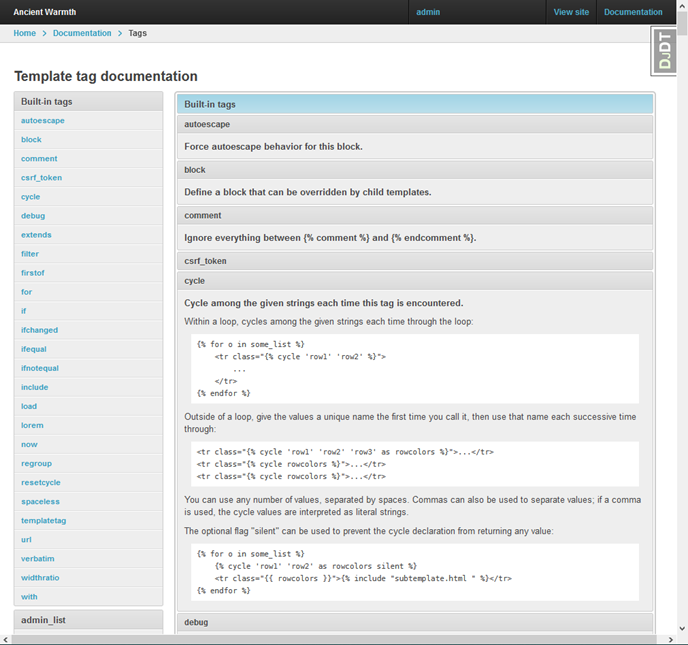
  Tags are viewable at <code><a href='http://http://localhost:8000/admin/doc/tags/' target='_blank' rel="nofollow"><code>http://localhost:8000/admin/doc/tags/</code></a></code>.
</p>
<div class='imgWrapper imgFlex inline fullsize' style=''>
    <picture class='imgPicture'>
  <source srcset="/blog/django/documentationLinkTags.webp" type="image/webp">
  <source srcset="/blog/django/documentationLinkTags.png" type="image/png">
  <img 
  class="imgImg rounded shadow"
  src="/blog/django/documentationLinkTags.png"
  style='width: 100%; '
/>
</picture>
</div>
<!-- endregion -->


<!-- #region Filter Documentation -->
<h3 id="filters">Filter Documentation</h3>
<p>
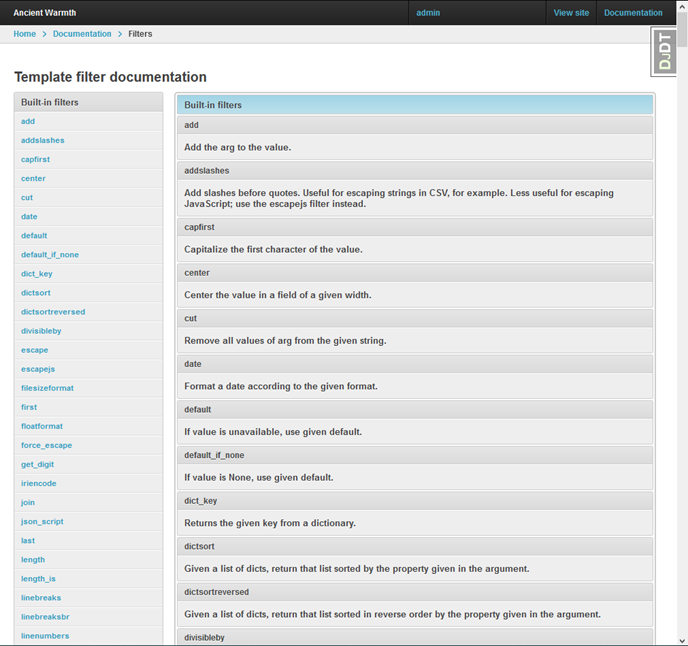
  Filters are viewable at <code><a href='http://http://localhost:8000/admin/doc/filters/' target='_blank' rel="nofollow"><code>http://localhost:8000/admin/doc/filters/</code></a></code>.
</p>
<div class='imgWrapper imgFlex inline fullsize' style=''>
    <picture class='imgPicture'>
  <source srcset="/blog/django/documentationLinkFilters.webp" type="image/webp">
  <source srcset="/blog/django/documentationLinkFilters.png" type="image/png">
  <img 
  class="imgImg rounded shadow"
  src="/blog/django/documentationLinkFilters.png"
  style='width: 100%; '
/>
</picture>
</div>
<!-- endregion -->


<!-- #region Model Documentation -->
<h3 id="models">Model Documentation</h3>
<p>
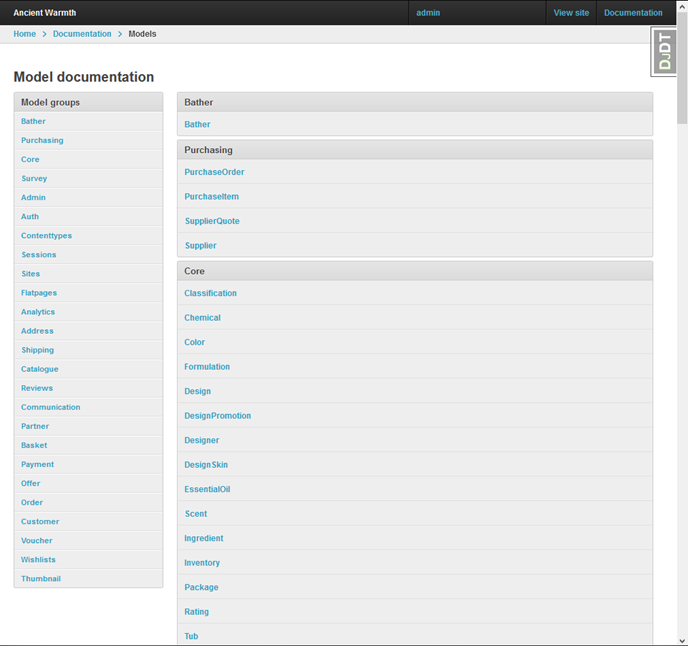
  A clickable listing of all Django models for your webapp is available at
  <code><a href='http://http://localhost:8000/admin/doc/models/' target='_blank' rel="nofollow"><code>http://localhost:8000/admin/doc/models/</code></a></code>
  Some generally useful Django-Oscar models to view documentation for are:
</p>
<ul>
  <li><a href='http://localhost:8000/admin/doc/models/address.useraddress/' target='_blank' rel="nofollow"><code>address.UserAddress</code></a></li>
  <li><a href='http://localhost:8000/admin/doc/models/auth.permission/' target='_blank' rel="nofollow"><code>auth.Permission</code></a></li>
  <li><a href='http://localhost:8000/admin/doc/models/auth.site/' target='_blank' rel="nofollow"><code>auth.Site</code></a></li>
  <li><a href='http://localhost:8000/admin/doc/models/auth.user/' target='_blank' rel="nofollow"><code>auth.User</code></a></li>
  <li><a href='http://localhost:8000/admin/doc/models/basket.basket/' target='_blank' rel="nofollow"><code>basket.Basket</code></a></li>
  <li><a href='http://localhost:8000/admin/doc/models/basket.line/' target='_blank' rel="nofollow"><code>basket.Line</code></a></li>
  <li><a href='http://localhost:8000/admin/doc/models/basket.lineattribute/' target='_blank' rel="nofollow"><code>basket.LineAttribute</code></a></li>
  <li><a href='http://localhost:8000/admin/doc/models/catalogue.attributeoption/' target='_blank' rel="nofollow"><code>catalogue.AttributeOption</code></a></li>
  <li><a href='http://localhost:8000/admin/doc/models/catalogue.attributeoptiongroup/' target='_blank' rel="nofollow"><code>catalogue.AttributeOptionGroup</code></a></li>
  <li><a href='http://localhost:8000/admin/doc/models/catalogue.category/' target='_blank' rel="nofollow"><code>catalogue.Category</code></a></li>
  <li><a href='http://localhost:8000/admin/doc/models/catalogue.option/' target='_blank' rel="nofollow"><code>catalogue.Option</code></a></li>
  <li><a href='http://localhost:8000/admin/doc/models/catalogue.product/' target='_blank' rel="nofollow"><code>catalogue.Product</code></a></li>
  <li><a href='http://localhost:8000/admin/doc/models/catalogue.productattribute/' target='_blank' rel="nofollow"><code>catalogue.ProductAttribute</code></a></li>
  <li><a href='http://localhost:8000/admin/doc/models/catalogue.productattributevalue/' target='_blank' rel="nofollow"><code>catalogue.ProductAttributeValue</code></a></li>
  <li><a href='http://localhost:8000/admin/doc/models/catalogue.productclass/' target='_blank' rel="nofollow"><code>catalogue.ProductClass</code></a></li>
  <li><a href='http://localhost:8000/admin/doc/models/catalogue.productrecommendation/' target='_blank' rel="nofollow"><code>catalogue.ProductRecommendation</code></a></li>
  <li><a href='http://localhost:8000/admin/doc/models/customer.productalert/' target='_blank' rel="nofollow"><code>customer.ProductAlert</code></a></li>
  <li><a href='http://localhost:8000/admin/doc/models/flatpages.flatpage/' target='_blank' rel="nofollow"><code>flatpages.Flatpage</code></a></li>
  <li><a href='http://localhost:8000/admin/doc/models/offer.condition/' target='_blank' rel="nofollow"><code>offer.Condition</code></a></li>
  <li><a href='http://localhost:8000/admin/doc/models/offer.conditionaloffer/' target='_blank' rel="nofollow"><code>offer.ConditionalOffer</code></a></li>
  <li><a href='http://localhost:8000/admin/doc/models/offer.range/' target='_blank' rel="nofollow"><code>offer.Range</code></a></li>
  <li><a href='http://localhost:8000/admin/doc/models/order.order/' target='_blank' rel="nofollow"><code>order.Order</code></a></li>
  <li><a href='http://localhost:8000/admin/doc/models/partner.partner/' target='_blank' rel="nofollow"><code>partner.Partner</code></a></li>
  <li><a href='http://localhost:8000/admin/doc/models/partner.stockalert/' target='_blank' rel="nofollow"><code>partner.StockAlert</code></a></li>
  <li><a href='http://localhost:8000/admin/doc/models/partner.stockrecord/' target='_blank' rel="nofollow"><code>partner.StockRecord</code></a></li>
  <li><a href='http://localhost:8000/admin/doc/models/payment.transaction/' target='_blank' rel="nofollow"><code>payment.Transaction</code></a></li>
  <li><a href='http://localhost:8000/admin/doc/models/reviews.vote/' target='_blank' rel="nofollow"><code>reviews.Vote</code></a></li>
  <li><a href='http://localhost:8000/admin/doc/models/shipping.orderanditemcharges/' target='_blank' rel="nofollow"><code>shipping.OrderAndItemCharges</code></a></li>
  <li><a href='http://localhost:8000/admin/doc/models/voucher.voucher/' target='_blank' rel="nofollow"><code>voucher.Voucher</code></a></li>
  <li><a href='http://localhost:8000/admin/doc/models/voucher.voucherapplication/' target='_blank' rel="nofollow"><code>voucher.VoucherApplication</code></a></li>
  <li><a href='http://localhost:8000/admin/doc/models/voucher.voucherset/' target='_blank' rel="nofollow"><code>voucher.VoucherSet</code></a></li>
  <li><a href='http://localhost:8000/admin/doc/models/voucher.voucherset/' target='_blank' rel="nofollow"><code>voucher.VoucherSet</code></a></li>
  <li><a href='http://localhost:8000/admin/doc/models/wishlists.line/' target='_blank' rel="nofollow"><code>wishlists.Line</code></a></li>
  <li><a href='http://localhost:8000/admin/doc/models/wishlists.wishlist/' target='_blank' rel="nofollow"><code>wishlists.WishList</code></a></li>
</ul>
<div class='imgWrapper imgFlex inline fullsize' style=''>
    <picture class='imgPicture'>
  <source srcset="/blog/django/documentationLinkModels.webp" type="image/webp">
  <source srcset="/blog/django/documentationLinkModels.png" type="image/png">
  <img 
  class="imgImg rounded shadow"
  src="/blog/django/documentationLinkModels.png"
  style='width: 100%; '
/>
</picture>
</div>
<!-- endregion -->


<!-- #region View Documentation -->
<h3 id="views">View Documentation</h3>
<p>
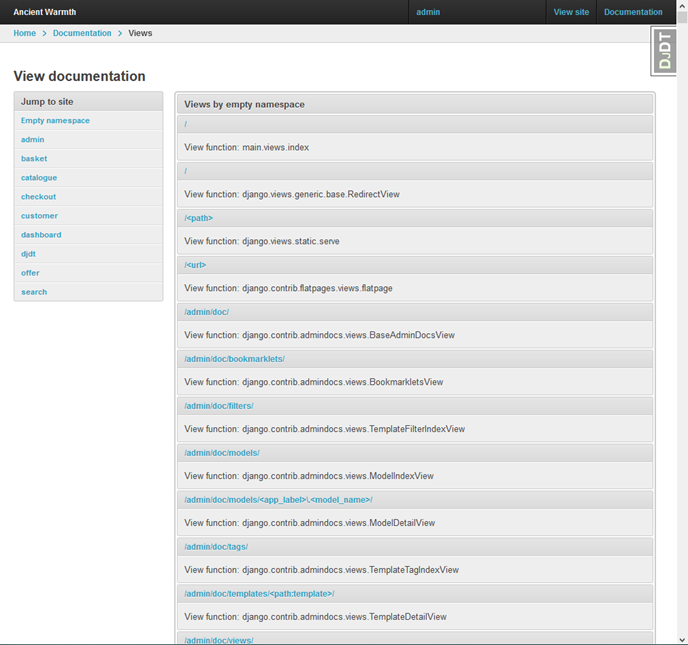
  Views are viewable at <code><a href='http://http://localhost:8000/admin/doc/views/' target='_blank' rel="nofollow"><code>http://localhost:8000/admin/doc/views/</code></a></code>.
  The views are summarized on one page, with the first docstring sentence displayed.
  Clicking on a view displays the entire docstring.
</p>
<div class='imgWrapper imgFlex inline fullsize' style=''>
    <picture class='imgPicture'>
  <source srcset="/blog/django/documentationLinkViews.webp" type="image/webp">
  <source srcset="/blog/django/documentationLinkViews.png" type="image/png">
  <img 
  class="imgImg rounded shadow"
  src="/blog/django/documentationLinkViews.png"
  style='width: 100%; '
/>
</picture>
</div>
<!-- endregion -->


<!-- #region Bookmarklets -->
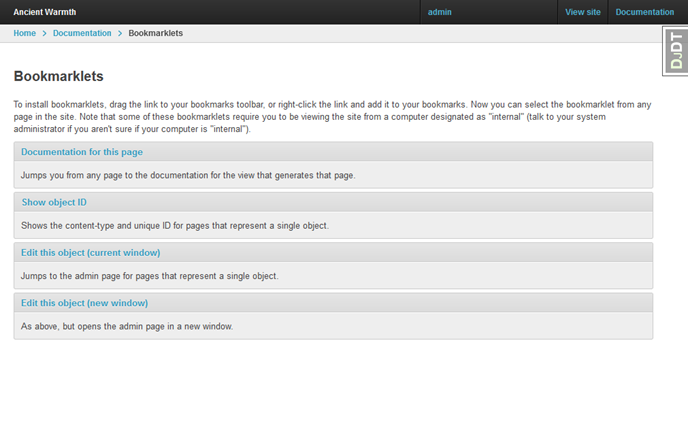
<h3 id="bookmarklets">Bookmarklets</h3>
<div class='imgWrapper imgFlex inline fullsize' style=''>
    <picture class='imgPicture'>
  <source srcset="/blog/django/documentationLinkBookmarklets.webp" type="image/webp">
  <source srcset="/blog/django/documentationLinkBookmarklets.png" type="image/png">
  <img 
  class="imgImg rounded shadow"
  src="/blog/django/documentationLinkBookmarklets.png"
  style='width: 100%; '
/>
</picture>
</div>
<!-- endregion -->
<!-- endregion -->


<!-- #region About Bookmarklets -->
<h2 id="bms_about">About Bookmarklets</h2>
<div class="pullQuote">
  Bookmarklets are broken
</div>
<p class="alert rounded shadow">
  The official documentation for Django bookmarklets is skimpy and inaccurate,
  and all the other documentation on this feature that I was able to find is badly out of date and incomplete.
  The feature is completely broken, another example of Django bitrot.
</p>
<p>
  This (updated) information is based on two sources, plus my own investigation:
</p>
<ul>
  <li><a href='https://www.b-list.org/weblog/2007/nov/07/bookmarklets/' target='_blank' rel="nofollow">James Bennett&rsquo;s Documentation bookmarklets</a>, published in November 2007.</li>
  <li>The <a href='https://docs.djangoproject.com' target='_blank' rel="nofollow">official Django documentation</a>.</li>
</ul>
<p>
  Bookmarklets are bits of JavaScript to be dragged into your browser’s bookmarks bar,
  and then clicked when visiting pages on your Django-powered website.
</p>
<p>
  Bookmarkets will be activated for any authenticated user who has the <code>is_staff</code> flag set <code>True</code>,
  or if the website is served from an IP address specified in the
  <a href='https://docs.djangoproject.com/en/stable/ref/settings/#internal-ips' target='_blank' rel="nofollow"><code>INTERNAL_IPS</code></a> setting.
  I split my Django webapp&rsquo;s settings into <code>dev</code>, <code>prod</code> and <code>test</code>;
  the <code>INTERNAL_IPS</code> settings for <code>dev</code> are:
</p>
<div class="jekyll_pre" >
<div class='codeLabel unselectable' data-lt-active='false'>settings/dev.py</div>
<pre data-lt-active='false' class='maxOneScreenHigh copyContainer' id='id2d57852df1b8'><button class='copyBtn' data-clipboard-target='#id2d57852df1b8' title='Copy to clipboard'><img src='/assets/images/clippy.svg' alt='Copy to clipboard' style='width: 13px'></button>INTERNAL_IPS = [
    '127.0.0.1',
]</pre>

</div>

<!-- endregion -->
<!-- endregion -->


<!-- #region Using Bookmarklets -->
<h2 id="bms_using">Using Bookmarklets</h2>
<p>
  To make a bookmarklet available, drag a bookmarklet link from the admin page
  (usually <code><a href='http://http://localhost:8000/admin/doc/bookmarklets/' target='_blank' rel="nofollow"><code>http://localhost:8000/admin/doc/bookmarklets/</code></a></code>)
  to your web browser&rsquo;s bookmarks toolbar, or right-click the link and add it to your bookmarks.
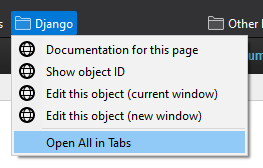
  I used Firefox to create a bookmark folder called Django, and added a link for every type of bookmarklet.
  The resulting bookmark folder looked like this:
</p>
<div class='imgWrapper imgFlex center halfsize' style=''>
    <picture class='imgPicture'>
  <source srcset="/blog/django/bookmarkletMenu.webp" type="image/webp">
  <source srcset="/blog/django/bookmarkletMenu.png" type="image/png">
  <img 
  class="imgImg rounded shadow"
  src="/blog/django/bookmarkletMenu.png"
  style='width: 100%; '
/>
</picture>
</div>

<p>
  Now, I am supposed to be able to select bookmarklets from the non-admin pages in my webapp.
  Here are my results of using each type of bookmarklet on the autogenerated documentation for my
  <code>core.Formulation</code> Django model class, which was displayed at
  <code>http://localhost:8000/admin/doc/models/core.formulation/</code>:
</p>

<dl>
  <dt>Documentation for this page</dt>
    <dd>
      This error message appeared: <code>formulation with ID “doc/views/django.contrib.admin.options.ModelAdmin.changelist_view” doesn’t exist.
      Perhaps it was deleted?</code>
    </dd>

  <dt>Show object ID</dt>
  <dd><div class='imgWrapper imgFlex right' style=''>
    <picture class='imgPicture'>
  <source srcset="/blog/django/bookmarkletId.webp" type="image/webp">
  <source srcset="/blog/django/bookmarkletId.png" type="image/png">
  <img 
  class="imgImg rounded shadow"
  src="/blog/django/bookmarkletId.png"
  style='width: 100%; '
/>
</picture>
</div>
    Some of my webapp pages did not respond to this bookmarklet,
    while others displayed a small <code>div</code> which did not contain useful information.
  </dd>

  <dt><code>Edit this object (current window)</code></dt>
  <dd>Nothing happened. No error message on the JavaScript console.</dd>

  <dt><code>Edit this object (new window)</code></dt>
  <dd>Nothing happened. No error message on the JavaScript console.</dd>
</dl>
<!-- endregion -->]]></content><author><name>Mike Slinn</name></author><category term="Django" /><category term="Django-Oscar" /><summary type="html"><![CDATA[Documenting custom Django apps using the Django admin documentation generator.]]></summary></entry><entry><title type="html">Secrets of Setting Up Django EMail</title><link href="https://www.mslinn.com/django/3000-django-email.html" rel="alternate" type="text/html" title="Secrets of Setting Up Django EMail" /><published>2021-05-18T00:00:00-04:00</published><updated>2021-05-18T00:00:00-04:00</updated><id>https://www.mslinn.com/django/3000-django-email</id><content type="html" xml:base="https://www.mslinn.com/django/3000-django-email.html"><![CDATA[<!-- #region intro -->
<p>
  Argh, gather around, and I'll tell ye a tale of the secrets of setting Up Django email.
  Yon scurvey dogs tend to leave out some important information in the documentation.
  Even those dastardly cretins answering questions at StackOverflow won&rsquo;t tell the full tale,
  not with all the important juicy bits.
</p>
<div class='imgWrapper imgFlex center' style='width: 70%;'>
    <picture class='imgPicture'>
  <source srcset="/blog/images/pirateCodex_690x460.webp" type="image/webp">
  <source srcset="/blog/images/pirateCodex_690x460.png" type="image/png">
  <img 
  class="imgImg rounded shadow"
  src="/blog/images/pirateCodex_690x460.png"
  style='width: 100%; '
/>
</picture>
</div>
<!-- endregion -->


<!-- #region EMail Server Settings -->
<h2 id="config">EMail Server Settings</h2>
<p>
  These are the DJango settings I use to send email from one of
  <a href='https://www.rackspace.com/applications/rackspace-email' target='_blank' rel="nofollow">Rackspace EMail accounts</a>.
  Notice how I have highlighted a portion of the <code>EMAIL_BACKEND</code> value (<code class="bg_yellow">smtp</code>).
  <a href='https://docs.djangoproject.com/en/stable/topics/email/#smtp-backend' target='_blank' rel="nofollow">That is the backend</a>
  which will actually send email, instead of merely accepting the email request and logging it without actually sending anything email.
</p>

<!-- #region  -->
<div class="jekyll_pre" >
<div class='codeLabel unselectable' data-lt-active='false'>settings.py</div>
<pre data-lt-active='false' class='maxOneScreenHigh copyContainer' id='id8ece7c2dd86b'><button class='copyBtn' data-clipboard-target='#id8ece7c2dd86b' title='Copy to clipboard'><img src='/assets/images/clippy.svg' alt='Copy to clipboard' style='width: 13px'></button>EMAIL_BACKEND = 'django.core.mail.backends.<span class="bg_yellow">smtp</span>.EmailBackend'
EMAIL_HOST = 'secure.emailsrvr.com'
EMAIL_HOST_PASSWORD = '****'
EMAIL_HOST_USER = 'email@domain.com'
EMAIL_PORT = 587
EMAIL_USE_TLS = True
EMAIL_USE_SSL = False</pre>

</div>

<!-- endregion -->
<p>
  <a href='https://docs.djangoproject.com/en/stable/topics/email/#console-backend' target='_blank' rel="nofollow">This is the underdocumented backend</a>
  that will cause you untold grief if you don't know about it:
</p>

<div class="jekyll_pre" >
<div class='codeLabel unselectable' data-lt-active='false'>settings.py</div>
<pre data-lt-active='false' class='maxOneScreenHigh copyContainer' id='id057191db5a17'><button class='copyBtn' data-clipboard-target='#id057191db5a17' title='Copy to clipboard'><img src='/assets/images/clippy.svg' alt='Copy to clipboard' style='width: 13px'></button>EMAIL_BACKEND = 'django.core.mail.backends.<span class="bg_yellow">console</span>.EmailBackend'</pre>

</div>

<p>
    Unfortunately, some overly helpful but horribly misguided soul decided to make the console email backend the default.
    That backend does not actually send email, it is just a stub.
</p>
<!-- endregion -->


<!-- #region Unit Tests Change the Middleware Without Warning -->
<h2 id="test">Unit Tests Change the Middleware Without Warning</h2>
<p>
  In an outstanding display of misguided overworking of an API,
  when in unit test mode,
  <a href='https://docs.djangoproject.com/en/stable/topics/email/#console-backend' target='_blank' rel="nofollow">Django changes the middleware without notice</a>.
  The documentation does mention this misbehavior, if you know where to look.
  You'll never find that information unless you know it is there.
</p>
<p>
  The middleware that gets swapped in also does not actually send email.
  No, your code is not broken, you are caught between a poor design decision and inadequate documentation.
  I highlighted the magic pixie dust you need to make emails work in unit tests.
</p>

<!-- #region  -->
<div class="jekyll_pre" >
<div class='codeLabel unselectable' data-lt-active='false'>thing_model/tests.py</div>
<pre data-lt-active='false' class='maxOneScreenHigh copyContainer' id='id5c51c8289241'><button class='copyBtn' data-clipboard-target='#id5c51c8289241' title='Copy to clipboard'><img src='/assets/images/clippy.svg' alt='Copy to clipboard' style='width: 13px'></button>from django.test import TestCase
from django.test.utils import override_settings<br>
# Import EMAIL_BACKEND so the value can be used to override
# Django's misguided email middleware switcheroo for unit tests
<span class="bg_yellow">from main.settings import EMAIL_BACKEND</span>
from thing_model.models import ThingModel<br>
class ThingModelTests(TestCase):<br>
    # See https://stackoverflow.com/a/49909468/553865
    <span class="bg_yellow">@override_settings(EMAIL_BACKEND=EMAIL_BACKEND)</span>
    def test_result_html(self):
        thing_model.email("blah@blah.com")</pre>

</div>

<!-- endregion -->
<!-- endregion -->


<!-- #region HTML and/or Text EMail -->
<h2 id="html">HTML and/or Text EMail</h2>
<p>
  Django can send plain text email, or HTML email, or both together.
  Here is a simplified example of how to send information from a model class
  as HTML and plaintext using Django email.
</p>
<!-- #region  -->
<div class="jekyll_pre" >
<div class='codeLabel unselectable' data-lt-active='false'>Model</div>
<pre data-lt-active='false' class='maxOneScreenHigh copyContainer' id='idd31d13d151d3'><button class='copyBtn' data-clipboard-target='#idd31d13d151d3' title='Copy to clipboard'><img src='/assets/images/clippy.svg' alt='Copy to clipboard' style='width: 13px'></button>from django.db import models
from django.core.mail import send_mail

class ThingModel(models.Model):
    # Define model fields here

    @property
    def as_html(self):
        return "&lt;h2>Title goes here&lt;/h2>\n&lt;p>Blah blah&lt;/p>\n"

    @property
    def as_text(self):
        return "Title goes here\nBlah blah\n"

    def email(self, email_address):
        # result is set to 1 for success, 0 for failure
        result = send_mail(
            subject = 'Test Email',
            message = self.as_text,
            html_message = self.as_html,
            from_email = 'email@domain.com',
            recipient_list = [ email_address ],
        )
        print(f"Result code for sending email={result}")</pre>

</div>

<!-- endregion -->
<!-- endregion -->]]></content><author><name>Mike Slinn</name></author><category term="Django" /><summary type="html"><![CDATA[Secrets of setting Up Django EMail... some important information is left out.]]></summary></entry><entry><title type="html">Investigating a Django-Oscar Production Setup</title><link href="https://www.mslinn.com/django/2900-oscar-prod.html" rel="alternate" type="text/html" title="Investigating a Django-Oscar Production Setup" /><published>2021-04-13T00:00:00-04:00</published><updated>2021-04-16T00:00:00-04:00</updated><id>https://www.mslinn.com/django/2900-oscar-prod</id><content type="html" xml:base="https://www.mslinn.com/django/2900-oscar-prod.html"><![CDATA[<p>
  In this article I share my progress setting up the Django-Oscar webapp that I've been working on for production.
  The app is nowhere near production-ready, so this article will actually discuss what I learned setting up a staging server.
</p>


<h2 id="http">Apache <span class="code">httpd</span> vs. Nginx</h2>
<p>
  Django is written in Python, so there are only two protocols that bridge Python code and web servers.
  The Python / httpd protocol that seems to have the best support and stability is wsgi.
</p>
<p>
  The two top choices for a web server that supports wsgi are Apache <code>httpd</code> and nginx.
  Both Apache httpd and <a href='https://nginx.org/' target='_blank' rel="nofollow">nginx</a> (pronounced engine-x) are a free, open-source,
  high-performance HTTP servers and reverse proxies.
  I have used them before.
  They are both solid.
  Apache is decades older.
  All the cool kids are using nginx these days.
</p>
<p>
  <a href='https://docs.djangoproject.com/en/stable/howto/deployment/' target='_blank' rel="nofollow">The Django documentation does not mention nginx.</a>
  At first, the lack of official support by Django for nginx concerned me somewhat,
  but my interactions with Django maintainers so far have shown me that there is a significant faction of those maintaners that is resistant to change of any kind.
</p>

<p>
  In looking for defensible reasons for choosing one http server over the other,
  I found some important information:
</p>
<div class='quote'>
  <div class='quoteText clearfix'>
  <a href='https://uwsgi-docs.readthedocs.io/en/latest/Nginx.html' target='_blank' rel="nofollow">The uWSGI module is included in the official Nginx distribution</a>
  since version 0.8.40.
  A version supporting Nginx 0.7.x is maintained in the uWSGI package.
  This is a stable handler commercially supported by Unbit.
  <br><br>
  The Apache2 mod_uwsgi module was the first web server integration module developed for uWSGI.
  <span class="bg_yellow">It is stable but could be better integrated with the Apache API.</span>
  It is commercially supported by Unbit.
  <br><br>
  Since uWSGI 0.9.6-dev a second Apache2 module called mod_Ruwsgi is included.
  It&rsquo;s more Apache API friendly.
  mod_Ruwsgi is not commercially supported by Unbit.
  <br><br>
  During the 1.2 development cycle, another module called mod_proxy_uwsgi has been added.
  In the near future, this should be the best choice for Apache-based deployments.
</div><div class='quoteAttribution'> &nbsp;&ndash;  <a href='https://uwsgi-docs.readthedocs.io/en/latest/WebServers.html' rel='nofollow' target='_blank'>uWSGI documentation</a></div>

  
</div>

<div class='quote'>
  <div class='quoteText clearfix'>
  <ul>
    <li>We were sorely disappointed with uWSGI.</li>
    <li>Gunicorn: A good, consistent performer for medium loads.</li>
    <li>
      <code>mod_wsgi</code>: Multi-threaded server with all cores fully pegged the entire time.
      <i>(Highest CPU usage of all contenders benchmarked.)</i>
    </li>
  </ul>
</div><div class='quoteAttribution'> &nbsp;&ndash;  <a href='https://www.appdynamics.com/blog/engineering/a-performance-analysis-of-python-wsgi-servers-part-2/' rel='nofollow' target='_blank'>A Performance Analysis of Python WSGI Servers, by AppDynamics</a></div>

  
</div>

<div class='quote'>
  <div class='quoteText clearfix'>
  Drawbacks to Gunicorn are much the same as uWSGI,
  though I personally have found Gunicorn to be more easily configurable than uWSGI.
  It still isn’t as quick or simple to configure and set up as using mod_wsgi with Apache,
  but on a performance level there is no comparison.
  <i>(Gunicorn outperforms <code>mod_wsgi</code>.)</i>
  </div><div class='quoteAttribution'> &nbsp;&ndash;  <a href='https://www.digitalocean.com/community/tutorials/django-server-comparison-the-development-server-mod_wsgi-uwsgi-and-gunicorn' rel='nofollow' target='_blank'>Django Server Comparison: The Development Server, Mod_WSGI, uWSGI, and Gunicorn, by Digital Ocean</a></div>

  
</div>

<p>
  Kurt Griffiths wrote a <a href='https://blog.kgriffs.com/2012/12/18/uwsgi-vs-gunicorn-vs-node-benchmarks.html' target='_blank' rel="nofollow">terrific benchmark</a> back in 2012.
  9 years later, I wonder how results might have changed?
</p>
<p>
  However, there may be a much more interesting option:
  <a href='/blog/2021/04/14/serverless-ecommerce.html'>hosting Django webapps as lambda functions</a>.
</p>

<p>
  Digital Ocean hosts a nice
  <a href='https://www.digitalocean.com/community/tools/nginx?domains.0.php.php=false&domains.0.python.python=true&domains.0.python.djangoRules=true&domains.0.routing.root=false' target='_blank' rel="nofollow">nginx / Django configuration tool</a>
  that works with any server, not necessarily at Digital Ocean.
</p>]]></content><author><name>Mike Slinn</name></author><category term="Django" /><category term="Django-Oscar" /><category term="nginx" /><summary type="html"><![CDATA[In this article I investigate how to setup my Django-Oscar webapp for production.]]></summary></entry><entry><title type="html">General Django-Oscar Notes</title><link href="https://www.mslinn.com/django/590-django-oscar-notes.html" rel="alternate" type="text/html" title="General Django-Oscar Notes" /><published>2021-04-05T00:00:00-04:00</published><updated>2021-04-05T00:00:00-04:00</updated><id>https://www.mslinn.com/django/590-django-oscar-notes</id><content type="html" xml:base="https://www.mslinn.com/django/590-django-oscar-notes.html"><![CDATA[<!-- #region -->
<h2 id="email">Customising Oscar’s communications</h2>
<p>
  (Sending email.)
</p>
<ul>
  <li><a href='http://docs.oscarcommerce.com/en/stable/howto/how_to_customise_oscar_communications.html' target='_blank' rel="nofollow">Customising Oscar’s communications</a>.</li>
  <li>
    <a href='https://docs.djangoproject.com/en/3.1/topics/email/' target='_blank' rel="nofollow">Django Email</a>, especially see
    <a href='https://docs.djangoproject.com/en/3.1/topics/email/' target='_blank' rel="nofollow">email backends</a>.
  </li>
  <li><a href='https://stackoverflow.com/q/58498197/553865' target='_blank' rel="nofollow">Sending email to partners</a> (StackOverflow)</li>
  <li><a href='https://docs.djangoproject.com/en/3.1/topics/email/#console-backend' target='_blank' rel="nofollow">Configuring backends.</a></li>
</ul>
<!-- endregion -->]]></content><author><name>Mike Slinn</name></author><category term="Django-Oscar" /><summary type="html"><![CDATA[General notes on Django-Oscar to self.]]></summary></entry><entry><title type="html">Python Dependency Management With Pip-Tools</title><link href="https://www.mslinn.com/django/400-pip-tools.html" rel="alternate" type="text/html" title="Python Dependency Management With Pip-Tools" /><published>2021-04-05T00:00:00-04:00</published><updated>2021-04-14T00:00:00-04:00</updated><id>https://www.mslinn.com/django/400-pip-tools</id><content type="html" xml:base="https://www.mslinn.com/django/400-pip-tools.html"><![CDATA[<!-- #region -->
<p>
  <code>Django-oscar</code> defines PIP dependencies with a
  <a href='https://github.com/django-oscar/django-oscar/blob/3.0.2/setup.py#L20-L44' target='_blank' rel="nofollow">setting called <code>install_requires</code></a>.
</p>
<div class="jekyll_pre" >
<div class='codeLabel unselectable' data-lt-active='false'>Django-oscar settings</div>
<pre data-lt-active='false' class='maxOneScreenHigh copyContainer' id='id8f848ad88033'><button class='copyBtn' data-clipboard-target='#id8f848ad88033' title='Copy to clipboard'><img src='/assets/images/clippy.svg' alt='Copy to clipboard' style='width: 13px'></button>install_requires = [
    &#39;django&gt;=2.2,&lt;3.2&#39;,
    # PIL is required for image fields, Pillow is the &quot;friendly&quot; PIL fork
    &#39;pillow&gt;=6.0&#39;,
    # We use the ModelFormSetView from django-extra-views for the basket page
    &#39;django-extra-views&gt;=0.13,&lt;0.14&#39;,
    # Search support
    &#39;django-haystack&gt;=3.0b1&#39;,
    # Treebeard is used for categories
    &#39;django-treebeard&gt;=4.3,&lt;4.5&#39;,
    # Babel is used for currency formatting
    &#39;Babel&gt;=1.0,&lt;3.0&#39;,
    # For manipulating search URLs
    &#39;purl&gt;=0.7&#39;,
    # For phone number field
    &#39;phonenumbers&#39;,
    &#39;django-phonenumber-field&gt;=3.0.0,&lt;4.0.0&#39;,
    # Used for oscar.test.newfactories
    &#39;factory-boy&gt;=2.4.1,&lt;3.0&#39;,
    # Used for automatically building larger HTML tables
    &#39;django-tables2&gt;=2.3,&lt;2.4&#39;,
    # Used for manipulating form field attributes in templates (eg: add
    # a css class)
    &#39;django-widget-tweaks&gt;=1.4.1&#39;,
]</pre>

</div>


<p>
  According to the documentation,
  <a href='https://pypi.org/project/pip-tools/' target='_blank' rel="nofollow"><code>pip-tools/</code></a> uses <code>install_requires</code>
  to maintain <code>requirements.txt</code>.
</p>
<div class="jekyll_pre" >
<div class='codeLabel unselectable' data-lt-active='false'>Shell</div>
<pre data-lt-active='false' class='maxOneScreenHigh copyContainer' id='id4ad01d593e06'><button class='copyBtn' data-clipboard-target='#id4ad01d593e06' title='Copy to clipboard'><img src='/assets/images/clippy.svg' alt='Copy to clipboard' style='width: 13px'></button><span class='unselectable'>$ </span>pip install pip-tools</pre>

</div>

<!-- endregion -->


<!-- #region -->
<h2 id="requirements.in">Layer 1: <span class="code">requirements.in</span></h2>
<p>
  I could not get the
  <a href='https://packaging.python.org/discussions/install-requires-vs-requirements/' target='_blank' rel="nofollow"><code>install_requires</code></a>
  setting to work with <code>pip-tools</code>.
  Instead, I was able to create a file called <code>requirements.in</code> to hold top-level dependencies,
  and <code>pip-tools</code> happily used it:
</p>
<div class="codeLabel">requirements.in</div>
<pre data-lt-active="false" class="pre_tag maxOneScreenHigh copyContainer" id="ide22e4d80f70a"><button class='copyBtn' data-clipboard-target='#ide22e4d80f70a'title='Copy to clipboard'><img src='/assets/images/clippy.svg' alt='Copy to clipboard' style='width: 13px'></button>boto3==1.17.27
django
django-cors-headers==3.7.0
django-extensions
django-oscar>=3.0.2,&lt;4.0.0
django_storages==1.11.1
django-grappelli==2.14.3
pip
pip-tools
psycopg2-binary==2.8.6
pycountry==20.7.3
python-decouple==3.4
sorl-thumbnail==12.6.3
</pre>


<p>
  Notice that <code>pip-tools</code> is an unpinned requirement :)
</p>
<p>
  With <code>requirements.in</code> in place, a new <code>requirements.txt</code> can be generated using the <code>pip-compile</code>
  command provided by <code>pip-tools</code>.
  Here is the <code>pip-compile</code> help message:
</p>
<!-- #region pre -->
<div class="jekyll_pre" >
<div class='codeLabel unselectable' data-lt-active='false'>Shell</div>
<pre data-lt-active='false' class='maxOneScreenHigh copyContainer' id='idd534576daebf'><button class='copyBtn' data-clipboard-target='#idd534576daebf' title='Copy to clipboard'><img src='/assets/images/clippy.svg' alt='Copy to clipboard' style='width: 13px'></button><span class='unselectable'>(aw) $ </span>pip-compile -h
<span class='unselectable'>Usage: pip-compile [OPTIONS] [SRC_FILES]...

  Compiles requirements.txt from requirements.in specs.

Options:
  --version                       Show the version and exit.
  -v, --verbose                   Show more output
  -q, --quiet                     Give less output
  -n, --dry-run                   Only show what would happen, don&#39;t change
                                  anything

  -p, --pre                       Allow resolving to prereleases (default is
                                  not)

  -r, --rebuild                   Clear any caches upfront, rebuild from
                                  scratch

  -f, --find-links TEXT           Look for archives in this directory or on
                                  this HTML page

  -i, --index-url TEXT            Change index URL (defaults to
                                  https://pypi.org/simple)

  --extra-index-url TEXT          Add additional index URL to search
  --cert TEXT                     Path to alternate CA bundle.
  --client-cert TEXT              Path to SSL client certificate, a single
                                  file containing the private key and the
                                  certificate in PEM format.

  --trusted-host TEXT             Mark this host as trusted, even though it
                                  does not have valid or any HTTPS.

  --header / --no-header          Add header to generated file
  --emit-trusted-host / --no-emit-trusted-host
                                  Add trusted host option to generated file
  --annotate / --no-annotate      Annotate results, indicating where
                                  dependencies come from

  -U, --upgrade                   Try to upgrade all dependencies to their
                                  latest versions

  -P, --upgrade-package TEXT      Specify particular packages to upgrade.
  -o, --output-file FILENAME      Output file name. Required if more than one
                                  input file is given. Will be derived from
                                  input file otherwise.

  --allow-unsafe / --no-allow-unsafe
                                  Pin packages considered unsafe: distribute,
                                  pip, setuptools.

                                  WARNING: Future versions of pip-tools will
                                  enable this behavior by default. Use --no-
                                  allow-unsafe to keep the old behavior. It is
                                  recommended to pass the --allow-unsafe now
                                  to adapt to the upcoming change.

  --generate-hashes               Generate pip 8 style hashes in the resulting
                                  requirements file.

  --reuse-hashes / --no-reuse-hashes
                                  Improve the speed of --generate-hashes by
                                  reusing the hashes from an existing output
                                  file.

  --max-rounds INTEGER            Maximum number of rounds before resolving
                                  the requirements aborts.

  --build-isolation / --no-build-isolation
                                  Enable isolation when building a modern
                                  source distribution. Build dependencies
                                  specified by PEP 518 must be already
                                  installed if build isolation is disabled.

  --emit-find-links / --no-emit-find-links
                                  Add the find-links option to generated file
  --cache-dir DIRECTORY           Store the cache data in DIRECTORY.
                                  [default: /home/mslinn/.cache/pip-tools]

  --pip-args TEXT                 Arguments to pass directly to the pip
                                  command.

  --emit-index-url / --no-emit-index-url
                                  Add index URL to generated file
  -h, --help                      Show this message and exit. </span></pre>

</div>

<!-- endregion -->
<p>
  Now I was able to update <code>requirements.txt</code> from <code>requirements.in</code>,
  and then upgrade all PIP packages like this:
</p>
<div class="jekyll_pre" >
<div class='codeLabel unselectable' data-lt-active='false'>Shell</div>
<pre data-lt-active='false' class='maxOneScreenHigh copyContainer' id='ide698b827c77b'><button class='copyBtn' data-clipboard-target='#ide698b827c77b' title='Copy to clipboard'><img src='/assets/images/clippy.svg' alt='Copy to clipboard' style='width: 13px'></button><span class='unselectable'>(aw) $ </span>pip-compile -U

<span class='unselectable'>(aw) $ </span>pip install --upgrade -r requirements.txt</pre>

</div>


<p>
  This could be written as one line.
</p>
<div class="jekyll_pre" >
<div class='codeLabel unselectable' data-lt-active='false'>Shell</div>
<pre data-lt-active='false' class='maxOneScreenHigh copyContainer' id='id90c92fb8e161'><button class='copyBtn' data-clipboard-target='#id90c92fb8e161' title='Copy to clipboard'><img src='/assets/images/clippy.svg' alt='Copy to clipboard' style='width: 13px'></button><span class='unselectable'>(aw) $ </span>pip-compile -U && \
pip install --upgrade -r requirements.txt</pre>

</div>

<div class='emoji big center' style=';'>&#x1F601;</div>
<!-- endregion -->


<!-- #region -->
<h2 id="layer2">Layer 2</h2>
<p>
  I wanted to take advantange of the <code>pip-tools</code>
  <a href='https://github.com/jazzband/pip-tools/#workflow-for-layered-requirements' target='_blank' rel="nofollow">layered requirements</a> feature.
  Overtop the basic dependencies listed in <code>requirements.in</code>,
  I also wanted to manage development dependencies in <code>dev.requirements.in</code>
  and deployment dependencies in <code>prod.requirements.in</code>.
  The <code>dev</code> and <code>prod</code> layers are siblings.
</p>


<h3 id="dev">Layer <span class="code">dev</span></h3>
<p>
  There is no need to pin <code>django-debug-toolbar</code> because it is constrained by the
  <code>django</code> dependency in the lower layer.
  Jack Cushman, a <code>pip-tools</code> contributor,
  <a href='https://lil.law.harvard.edu/blog/2019/05/20/improving-pip-compile-generate-hashes/' target='_blank' rel="nofollow">explains why the <code>--generate-hashes</code> option is important</a>.
</p>
<div class="codeLabel">dev.requirements.in</div>
<pre data-lt-active="false" class="pre_tag maxOneScreenHigh copyContainer" id="id2aa3a52bbe78"><button class='copyBtn' data-clipboard-target='#id2aa3a52bbe78'title='Copy to clipboard'><img src='/assets/images/clippy.svg' alt='Copy to clipboard' style='width: 13px'></button>-c requirements.txt
django-debug-toolbar
docutils
json5
pytest-django
PyYAML
</pre>


<div class="jekyll_pre" >
<div class='codeLabel unselectable' data-lt-active='false'>Shell</div>
<pre data-lt-active='false' class='maxOneScreenHigh copyContainer' id='id6461d4da8615'><button class='copyBtn' data-clipboard-target='#id6461d4da8615' title='Copy to clipboard'><img src='/assets/images/clippy.svg' alt='Copy to clipboard' style='width: 13px'></button><span class='unselectable'>(aw) $ </span>pip-compile dev.requirements.in --generate-hashes --allow-unsafe</pre>

</div>

<p>
  This produces <code>dev.requirements.txt</code>:
</p>
<div class="codeLabel">dev.requirements.txt</div>
<pre data-lt-active="false" class="pre_tag maxOneScreenHigh copyContainer" id="id14d5cf43aeb7">#
# This file is autogenerated by pip-compile
# To update, run:
#
#    pip-compile dev.requirements.in
#
asgiref==3.3.4
    # via
    #   -c requirements.txt
    #   django
django-debug-toolbar==3.2
    # via
    #   -c requirements.txt
    #   -r dev.requirements.in
django==3.1.8
    # via
    #   -c requirements.txt
    #   django-debug-toolbar
pytz==2021.1
    # via
    #   -c requirements.txt
    #   django
sqlparse==0.4.1
    # via
    #   -c requirements.txt
    #   django
    #   django-debug-toolbar
</pre>


<div class='quote'>
  <div class='quoteText clearfix'>
  The warning to use <code>--allow-unsafe</code> seems unnecessary &ndash;
  I believe that <code>--allow-unsafe</code> should be the default behavior for <code>pip-compile</code>.
  <br><br>
  I spent some time digging into the reasons that <code>pip-tools</code> considers some packages &ldquo;unsafe,&rdquo;
  and as best I can tell it is because it was thought that pinning those packages could potentially break <code>pip</code> itself,
  and thus break the user's ability to recover from a mistake.
  <br><br>
  This seems to no longer be true, if it ever was.
  Instead, failing to use <code>--allow-unsafe</code> is unsafe,
  as it means different environments will end up with different versions of key packages despite installing from identical
  <code>requirements.txt</code> files.
</div><div class='quoteAttribution'> &nbsp;&ndash;  <a href='https://lil.law.harvard.edu/blog/2019/05/20/improving-pip-compile-generate-hashes/' rel='nofollow' target='_blank'>Jack Cushman</a></div>

  
</div>


<h3 id="prod">Layer <span class="code">prod</span></h3>
<p>
  I added <code>gunicorn</code> as a production dependency, and was surprised to find that it declares
  lists a specific version of the Pyton <code>setuptools</code> as a transitive dependency.
</p>
<div class="codeLabel">prod.requirements.in</div>
<pre data-lt-active="false" class="pre_tag maxOneScreenHigh copyContainer" id="id04e2fc2f12f4"><button class='copyBtn' data-clipboard-target='#id04e2fc2f12f4'title='Copy to clipboard'><img src='/assets/images/clippy.svg' alt='Copy to clipboard' style='width: 13px'></button>-c requirements.txt
gunicorn
json5
</pre>


<div class="jekyll_pre" >
<div class='codeLabel unselectable' data-lt-active='false'>Shell</div>
<pre data-lt-active='false' class='maxOneScreenHigh copyContainer' id='id0cd9268b5a09'><button class='copyBtn' data-clipboard-target='#id0cd9268b5a09' title='Copy to clipboard'><img src='/assets/images/clippy.svg' alt='Copy to clipboard' style='width: 13px'></button><span class='unselectable'>(aw) $ </span>pip-compile prod.requirements.in --generate-hashes --allow-unsafe</pre>

</div>

<p>
  This produces <code>prod.requirements.txt</code>:
</p>
<div class="codeLabel">prod.requirements.txt</div>
<pre data-lt-active="false" class="pre_tag maxOneScreenHigh copyContainer" id="id2b063531f42c">#
# This file is autogenerated by pip-compile
# To update, run:
#
#    pip-compile --allow-unsafe --generate-hashes prod.requirements.in
#
gunicorn==20.1.0 \
    --hash=sha256:e0a968b5ba15f8a328fdfd7ab1fcb5af4470c28aaf7e55df02a99bc13138e6e8
    # via -r prod.requirements.in

# The following packages are considered to be unsafe in a requirements file:
setuptools==56.0.0 \
    --hash=sha256:08a1c0f99455307c48690f00d5c2ac2c1ccfab04df00454fef854ec145b81302 \
    --hash=sha256:7430499900e443375ba9449a9cc5d78506b801e929fef4a186496012f93683b5
    # via gunicorn
</pre>


<!-- endregion -->]]></content><author><name>Mike Slinn</name></author><category term="Django" /><category term="Django-Oscar" /><category term="Python" /><summary type="html"><![CDATA[Python dependency management with pip-tools]]></summary></entry><entry><title type="html">Django Models, Automatic Form Generation, Data Backup &amp;amp; Restore</title><link href="https://www.mslinn.com/django/2800-model-crud-form.html" rel="alternate" type="text/html" title="Django Models, Automatic Form Generation, Data Backup &amp;amp; Restore" /><published>2021-04-04T00:00:00-04:00</published><updated>2021-04-04T00:00:00-04:00</updated><id>https://www.mslinn.com/django/2800-model-crud-form</id><content type="html" xml:base="https://www.mslinn.com/django/2800-model-crud-form.html"><![CDATA[<!-- #region intro -->
<p>
  Django has a super-useful feature:
  Automatic HTML forms created for model
  <a href='https://developer.mozilla.org/en-US/docs/Glossary/CRUD' target='_blank' rel="nofollow">CRUD (Create, Read, Update, Delete)</a>.
  The <a href='https://developer.mozilla.org/en-US/docs/Learn/Server-side/Django/Forms' target='_blank' rel="nofollow">MDN Django Tutorial</a>
  has a page on this feature.
</p>
<div class="pullQuote">
    <div class='imgWrapper imgFlex right' style=''>
    <picture class='imgPicture'>
  <img 
  class="imgImg right"
  src="/django/assets/images/crud/pile-of-poo_1f4a9.webp"
  style='width: 100%; '
/>
</picture>
</div>
    Django's automatic CRUD form generation feature is degraded by poor integration with WYSIWYG HTML editors
</div>
<p>
  Every Django model automatically maps to a database table.
  Programmatically, new rows can be added to the table by creating new model instances.
  Those instances can be edited or deleted programmatically as well.
</p>
<!-- endregion -->


<!-- #region Automatic CRUD Form Generation -->
<h2 id="forms">Automatic CRUD Form Generation</h2>
<p>
  The wonderful thing is that every Django automatally creates an HTML forms-based editor for every model.
  These CRUID forms are easily to modify: their appearance can be styled and the content can be laid out easily.
  Just visit the <code>admin/</code> section of a Django website, for example:
  <code><a href='http://http://localhost:8000/admin' target='_blank' rel="nofollow"><code>http://localhost:8000/admin</code></a></code>.
  You will see a listing of all the model classes.
  If you are working with <code>django-oscar</code>, those classes will also be listed,
  grouped by Django app name.
</p>
<p>
  When I click on one of the apps I created, called <code>Pricing</code>, the browser showed all
  the model classes defined at <code><a href='http://http://localhost:8000/adminpricing/' target='_blank' rel="nofollow"><code>http://localhost:8000/adminpricing/</code></a></code>.
  Clicking on my <code>Chemical</code> model class listed all the instances already defined (there were none)
  at <code><a href='http://http://localhost:8000/adminpricing/chemical/' target='_blank' rel="nofollow"><code>http://localhost:8000/adminpricing/chemical/</code></a></code>.
  When I clicked on the <kbd>+&nbsp;Add&nbsp;chemical</kbd> button at the top right of the screen,
  I was presented with a form-based editor for all the model fields.
  This is the list page for my Ancient Warmth <code>Core</code> app's <code>Chemical</code> model:
</p>
<div class='imgWrapper imgFlex center fullsize' style=''>
    <picture class='imgPicture'>
  <img 
  class="imgImg rounded shadow"
  src="/django/assets/images/crud/aw_oscar_chemical_mgmt.webp"
  style='width: 100%; '
/>
</picture>
</div>
<p>
  I took advantage of Django's controls for laying out the information on this page.
  Most of the Chemical fields were listed, and I created <code>@property</code>s when a foreign key pointed to something interesting.
</p>
<!-- #region  -->
<div class="jekyll_pre" >
<div class='codeLabel unselectable' data-lt-active='false'>Portion of core/model.py</div>
<pre data-lt-active='false' class='maxOneScreenHigh copyContainer' id='idf1cecbd6236b'><button class='copyBtn' data-clipboard-target='#idf1cecbd6236b' title='Copy to clipboard'><img src='/assets/images/clippy.svg' alt='Copy to clipboard' style='width: 13px'></button>@admin.register(models.Chemical)
class ChemicalAdmin(admin.ModelAdmin):
  <b>list_display</b> = ('name', 'full_name', 'formula', 'remaining_inventory',
      'retail_price_per_kg', 'recommended_max_percent', 'designs',
      'bathers', 'usage_rate')
  <b>ordering</b> = ('name',)
  <b>search_fields</b> = ('name', 'formula')</pre>

</div>

<!-- endregion -->
<dl>
  <dt><code>list_display</code></dt>
  <dd>Specifies the model fields and properties to show from a Django model</dd>

  <dt><code>ordering</code></dt>
  <dd>Specifies the model fields to use as sort keys</dd>

  <dt><code>search_fields</code></dt>
  <dd>Specifies the model fields to search withing</dd>
</dl>
<!-- endregion -->


<!-- #region WSYWIG HTML Editor Fail -->
<h2 id="WSYWIG">WSYWIG HTML Editor Fail</h2>
<p>
  I wrote a <a href='http://localhost:4001/django/2600-wsiwyg-oscar.html' target='_blank' rel="nofollow">short piece on Django WYSIWYG HTML editors</a> yesterday.
  I don't know the full story yet.
  Seems like one of Django's potential strengths is being significantly weakened by the disarray with respect to
  official interfacing of at least one current WSIWYG HTML editors.
</p>
<p>
  I had previously installed <a href='https://grappelliproject.com/' target='_blank' rel="nofollow">Grapelli</a>,
  so I expected to see the
  <a href='https://www.tiny.cloud/blog/django-tinymce/' target='_blank' rel="nofollow">TinyMCE WYSIWYG HTML editor</a>
  visible for the <code>Text</code> fields, but that did not happen.
  I looked around for documentation,
  but only found a confusing set of out-of-date or poorly written instructions that could not be followed.
  What a mess!
  Maybe that is why other WYSIWYG editors are talked about &ndash; however,
  I have not seen good installation documentation for those either yet.
</p>
<!-- endregion -->


<!-- #region Field Order -->
<h2 id="order">Field Order</h2>
<p>
  The order that a model's fields appear in the web page can be controlled by defining a companion class
  in the same <code>models.py</code> file.
  For a model class called <code>MyModel</code>, the companion class is called <code>MyModelForm</code>.
  An inner class called <code>Meta</code> defines the field order, like this:
</p>
<div class="jekyll_pre" >
<div class='codeLabel unselectable' data-lt-active='false'>Shell</div>
<pre data-lt-active='false' class='maxOneScreenHigh copyContainer' id='ida2707bbb4bc4'><button class='copyBtn' data-clipboard-target='#ida2707bbb4bc4' title='Copy to clipboard'><img src='/assets/images/clippy.svg' alt='Copy to clipboard' style='width: 13px'></button>class MyModelForm(ModelForm):
    class Meta:
        model = Chemical
        fields = [
            'field1',
            'field2',
            'field3',
        ]</pre>

</div>

<p>
  This worked, and then the order flipped back to the order the fields were declared in <code>models.py</code>.
  Another mystery.
  Django is a mixture of wonderfulness and neglected bits, chattering to each other,
  rotting forgotten in a dank, dark corner.
</p>
<!-- endregion -->


<!-- #region Database Table Backup -->
<h2 id="backup">Database Table Backup</h2>
<p>
  Now that some data has been entered into a model's database tables, you probably want to back it up.
  Django stores the data for a model class called <code>MyModel</code> in an app called
  <code>MyApp</code> in a table called <code>MyAppMyModel</code>.
</p>
<p>
  I wrote the following script to back up the test data I was working with.
</p>
<!-- #region  -->
<div class="jekyll_pre" >
<div class='codeLabel unselectable' data-lt-active='false'>backup</div>
<pre data-lt-active='false' class='maxOneScreenHigh copyContainer' id='ida1b671004af3'><button class='copyBtn' data-clipboard-target='#ida1b671004af3' title='Copy to clipboard'><img src='/assets/images/clippy.svg' alt='Copy to clipboard' style='width: 13px'></button>#!/bin/bash

./manage.py dumpdata auth.user > backup/auth_user.json

APP=myApp
for X in model_1_name model_2_name model_3_name ; do
  ./manage.py dumpdata $APP.$X > backup/$APP.$X.json
done</pre>

</div>

<!-- endregion -->
<!-- endregion -->


<!-- #region Dumpdata Subcommand Help -->
<h3 id="dumpdata"><span class="code">Dumpdata</span> Subcommand Help</h3>
<p>
  To back up the data for a model in JSON format, use the <code>dumpdata</code> subcommand of <code>manage.py</code>.
  This is the help message:
</p>
<!-- #region  -->
<div class="jekyll_pre" >
<div class='codeLabel unselectable' data-lt-active='false'>Shell</div>
<pre data-lt-active='false' class='maxOneScreenHigh copyContainer' id='ide0680073425c'><button class='copyBtn' data-clipboard-target='#ide0680073425c' title='Copy to clipboard'><img src='/assets/images/clippy.svg' alt='Copy to clipboard' style='width: 13px'></button><span class='unselectable'>(aw) $ </span>./manage.py dumpdata --help
<span class='unselectable'>usage: manage.py dumpdata [-h] [--format FORMAT] [--indent INDENT] [--database DATABASE] [-e EXCLUDE] [--natural-foreign] [--natural-primary] [-a]
                          [--pks PRIMARY_KEYS] [-o OUTPUT] [--version] [-v {0,1,2,3}] [--settings SETTINGS] [--pythonpath PYTHONPATH] [--traceback]
                          [--no-color] [--force-color] [--skip-checks]
                          [app_label[.ModelName] [app_label[.ModelName] ...]]

Output the contents of the database as a fixture of the given format (using each model&#39;s default manager unless --all is specified).

positional arguments:
  app_label[.ModelName]
                        Restricts dumped data to the specified app_label or app_label.ModelName.

optional arguments:
  -h, --help            show this help message and exit
  --format FORMAT       Specifies the output serialization format for fixtures.
  --indent INDENT       Specifies the indent level to use when pretty-printing output.
  --database DATABASE   Nominates a specific database to dump fixtures from. Defaults to the &quot;default&quot; database.
  -e EXCLUDE, --exclude EXCLUDE
                        An app_label or app_label.ModelName to exclude (use multiple --exclude to exclude multiple apps/models).
  --natural-foreign     Use natural foreign keys if they are available.
  --natural-primary     Use natural primary keys if they are available.
  -a, --all             Use Django&#39;s base manager to dump all models stored in the database, including those that would otherwise be filtered or
                        modified by a custom manager.
  --pks PRIMARY_KEYS    Only dump objects with given primary keys. Accepts a comma-separated list of keys. This option only works when you specify one
                        model.
  -o OUTPUT, --output OUTPUT
                        Specifies file to which the output is written.
  --version             show program&#39;s version number and exit
  -v {0,1,2,3}, --verbosity {0,1,2,3}
                        Verbosity level; 0=minimal output, 1=normal output, 2=verbose output, 3=very verbose output
  --settings SETTINGS   The Python path to a settings module, e.g. &quot;myproject.settings.main&quot;. If this isn&#39;t provided, the DJANGO_SETTINGS_MODULE
                        environment variable will be used.
  --pythonpath PYTHONPATH
                        A directory to add to the Python path, e.g. &quot;/home/djangoprojects/myproject&quot;.
  --traceback           Raise on CommandError exceptions
  --no-color            Don&#39;t colorize the command output.
  --force-color         Force colorization of the command output.
  --skip-checks         Skip system checks. </span></pre>

</div>

<!-- endregion -->
<!-- endregion -->


<!-- #region Using the Dumpdata Subcommand -->
<h3 id="dumpdata_use">Using the <span class="code">Dumpdata</span> Subcommand</h3>
<p>
  The <code>dumpdata</code> subcommand needs the app and model field names to be specified in lower case.
</p>
<p>
  For example, to extract data for all the models in the <code>MyApp</code> app in JSON format, type:
</p>
<div class="jekyll_pre" >
<div class='codeLabel unselectable' data-lt-active='false'>Shell</div>
<pre data-lt-active='false' class='maxOneScreenHigh copyContainer' id='id4d901f51e063'><button class='copyBtn' data-clipboard-target='#id4d901f51e063' title='Copy to clipboard'><img src='/assets/images/clippy.svg' alt='Copy to clipboard' style='width: 13px'></button><span class='unselectable'>(aw) $ </span>./manage.py dumpdata myapp</pre>

</div>

<p>
  Of course, you can direct the JSON  to a file.
  Lets first make a <code>backup/</code> directory:
</p>
<div class="jekyll_pre" >
<div class='codeLabel unselectable' data-lt-active='false'>Shell</div>
<pre data-lt-active='false' class='maxOneScreenHigh copyContainer' id='iddc659101bd07'><button class='copyBtn' data-clipboard-target='#iddc659101bd07' title='Copy to clipboard'><img src='/assets/images/clippy.svg' alt='Copy to clipboard' style='width: 13px'></button><span class='unselectable'>(aw) $ </span>mkdir backup

<span class='unselectable'>(aw) $ </span>./manage.py dumpdata myapp &gt; backup/myapp.json</pre>

</div>


<p>
  To extract data for just the <code>MyModel</code> model <code>MyApp</code> app in JSON format:
</p>
<div class="jekyll_pre" >
<div class='codeLabel unselectable' data-lt-active='false'>Shell</div>
<pre data-lt-active='false' class='maxOneScreenHigh copyContainer' id='idf794fc2fe0ed'><button class='copyBtn' data-clipboard-target='#idf794fc2fe0ed' title='Copy to clipboard'><img src='/assets/images/clippy.svg' alt='Copy to clipboard' style='width: 13px'></button><span class='unselectable'>(aw) $ </span>./manage.py dumpdata myapp.mymodel</pre>

</div>

<p>
  To direct the JSON for this one field to a file:
</p>
<div class="jekyll_pre" >
<div class='codeLabel unselectable' data-lt-active='false'>Shell</div>
<pre data-lt-active='false' class='maxOneScreenHigh copyContainer' id='id375aa593bd42'><button class='copyBtn' data-clipboard-target='#id375aa593bd42' title='Copy to clipboard'><img src='/assets/images/clippy.svg' alt='Copy to clipboard' style='width: 13px'></button><span class='unselectable'>(aw) $ </span>./manage.py dumpdata myapp &gt; backup/myapp.mymodel.json</pre>

</div>

<!-- endregion -->


<!-- #region Database Table Restore -->
<h2 id="restore">Database Table Restore</h2>

<!-- #region Loaddata Subcommand Help -->
<h3 id="loaddata"><span class="code">Loaddata</span> Subcommand Help</h3>
<p>
  To restore the data from a backup for a model in JSON format, use the <code>loaddata</code> subcommand of <code>manage.py</code>.
  This is the help message:
</p>
<!-- #region  -->
<div class="jekyll_pre" >
<div class='codeLabel unselectable' data-lt-active='false'>Shell</div>
<pre data-lt-active='false' class='maxOneScreenHigh copyContainer' id='id699d6559ab63'><button class='copyBtn' data-clipboard-target='#id699d6559ab63' title='Copy to clipboard'><img src='/assets/images/clippy.svg' alt='Copy to clipboard' style='width: 13px'></button><span class='unselectable'>(aw) $ </span>./manage.py loaddata --help
<span class='unselectable'>usage: manage.py loaddata [-h] [--database DATABASE] [--app APP_LABEL] [--ignorenonexistent] [-e EXCLUDE] [--format FORMAT] [--version] [-v {0,1,2,3}]
[--settings SETTINGS] [--pythonpath PYTHONPATH] [--traceback] [--no-color] [--force-color] [--skip-checks]
fixture [fixture ...]

Installs the named fixture(s) in the database.

positional arguments:
fixture               Fixture labels.

optional arguments:
-h, --help            show this help message and exit
--database DATABASE   Nominates a specific database to load fixtures into. Defaults to the &quot;default&quot; database.
--app APP_LABEL       Only look for fixtures in the specified app.
--ignorenonexistent, -i
Ignores entries in the serialized data for fields that do not currently exist on the model.
-e EXCLUDE, --exclude EXCLUDE
An app_label or app_label.ModelName to exclude. Can be used multiple times.
--format FORMAT       Format of serialized data when reading from stdin.
--version             show program&#39;s version number and exit
-v {0,1,2,3}, --verbosity {0,1,2,3}
Verbosity level; 0=minimal output, 1=normal output, 2=verbose output, 3=very verbose output
--settings SETTINGS   The Python path to a settings module, e.g. &quot;myproject.settings.main&quot;. If this isn&#39;t provided, the DJANGO_SETTINGS_MODULE
environment variable will be used.
--pythonpath PYTHONPATH
A directory to add to the Python path, e.g. &quot;/home/djangoprojects/myproject&quot;.
--traceback           Raise on CommandError exceptions
--no-color            Don&#39;t colorize the command output.
--force-color         Force colorization of the command output.
--skip-checks         Skip system checks. </span></pre>

</div>

<!-- endregion -->
<!-- endregion -->


<!-- #region Using the Loaddata Subcommand -->
<h3 id="loaddata_use">Using the <span class="code">Loaddata</span> Subcommand</h3>
<p>
  The <code>loaddata</code> subcommand just needs the name of the backup file to read.
</p>
<div class="jekyll_pre" >
<div class='codeLabel unselectable' data-lt-active='false'>Shell</div>
<pre data-lt-active='false' class='maxOneScreenHigh copyContainer' id='ida4bdf1890f40'><button class='copyBtn' data-clipboard-target='#ida4bdf1890f40' title='Copy to clipboard'><img src='/assets/images/clippy.svg' alt='Copy to clipboard' style='width: 13px'></button><span class='unselectable'>(aw) $ </span>./manage.py loaddata backup/myapp.json</pre>

</div>


<p>
  I wrote this script to restore from the JSON backups.
  Seems I am scrubbing and recreating the database every few hours right now.
</p>
<!-- #region  -->
<div class="jekyll_pre" >
<div class='codeLabel unselectable' data-lt-active='false'>restore</div>
<pre data-lt-active='false' class='maxOneScreenHigh copyContainer' id='id382074a4b478'><button class='copyBtn' data-clipboard-target='#id382074a4b478' title='Copy to clipboard'><img src='/assets/images/clippy.svg' alt='Copy to clipboard' style='width: 13px'></button>#!/bin/bash

./manage.py dumpdata auth.user > backup/auth_user.json

APP=myApp
for X in model_1_name model_2_name model_3_name ; do
  ./manage.py dumpdata $APP.$X > backup/$APP.$X.json
done
for X in model_1_name model_2_name model_3_name; do
  FN="backup/$APP.$X.json"
  if [ -f "$FN" ]; then
    ./manage.py loaddata "backup/$APP.$X.json"
  fi
done</pre>

</div>

<!-- endregion -->
<!-- endregion -->
<!-- endregion -->]]></content><author><name>Mike Slinn</name></author><category term="Django" /><summary type="html"><![CDATA[Defining a Django model, featuring automatic form generation, data backup and restore.]]></summary></entry><entry><title type="html">WSIWYG HTML Editors for Django-Oscar</title><link href="https://www.mslinn.com/django/2600-wsiwyg-oscar.html" rel="alternate" type="text/html" title="WSIWYG HTML Editors for Django-Oscar" /><published>2021-03-30T00:00:00-04:00</published><updated>2021-03-30T00:00:00-04:00</updated><id>https://www.mslinn.com/django/2600-wsiwyg-oscar</id><content type="html" xml:base="https://www.mslinn.com/django/2600-wsiwyg-oscar.html"><![CDATA[<p>
  <code>Django-oscar</code> 3.0.2 uses v5.6.2 <a href='https://pypi.org/project/django-tinymce/' target='_blank' rel="nofollow">TinyMCE</a> as a WSIWYG HTML Editor.
  TinyMCE is used in the <code>django-oscar</code> dashboard for all textarea elements with the class <code>wysiwyg</code>.
  For example, the Admin Emails Template Editor is powered by TinyMCE.
</p>
<p>
  TinyMCE has successfully been used with Django and <code>django-oscar</code> for years and
  <a href='https://stackoverflow.com/questions/34157932/tinymce-with-django-less-options-for-editing' target='_blank' rel="nofollow">the combination is well understood.</a>
  <a href='https://pypi.org/project/django-summernote/' target='_blank' rel="nofollow"><code>Django-summernote</code></a> seems to have been getting more attention lately as a resource for Django apps,
  instead of reusing the TinyMCE arftifacts already provided by the Django admin apps.
  Is there a significant reason to
  <a href='https://www.g2.com/compare/summernote-vs-tinymce' target='_blank' rel="nofollow">use Summernote <code>django-oscar</code> custom code</a>?
  I do not know the answer.
  Below is all I know at this point.
</p>
<div class='imgWrapper imgBlock center halfsize' style=''>
  <figure>
    <a href='https://www.tiny.cloud/tinymce/' target='_blank' class='imgImgUrl'>
  <picture class='imgPicture'>
  <source srcset="/blog/images/django/tinymce.webp" type="image/webp">
  <source srcset="/blog/images/django/tinymce.png" type="image/png">
  <img alt='TinyMCE'
  class="imgImg "
  src="/blog/images/django/tinymce.png"
  style='width: 100%; '
  title='TinyMCE'
/>
</picture>
</a>
    <figcaption class='imgFigCaption halfsize'>
  <a href="https://www.tiny.cloud/tinymce/" target='_blank'>
  TinyMCE
</a>
</figcaption>
  </figure>
</div>

<h2 id="where">TinyMCE Use in <span class="code">Django-Oscar</span></h2>
<p>
  <a href='https://django-oscar.readthedocs.io/en/latest/releases/v0.6.html?highlight=tinymce#bootstrap-wysihtml5-replaced-by-tinymce' target='_blank' rel="nofollow"><code>Django-oscar.readthedocs.io</code></a> shows where TinyMCE is used by <code>django-oscar</code>.
    Directly examining the <code>django-oscar</code> Git repository shows more specific information:
</p>
<div class="jekyll_pre" >
<div class='codeLabel unselectable' data-lt-active='false'>Shell</div>
<pre data-lt-active='false' class='maxOneScreenHigh copyContainer' id='id42fc9e9d8553'><button class='copyBtn' data-clipboard-target='#id42fc9e9d8553' title='Copy to clipboard'><img src='/assets/images/clippy.svg' alt='Copy to clipboard' style='width: 13px'></button><span class='unselectable'>(aw) $ </span>git grep wysiwyg  # django-oscar GitHub project
<span class='unselectable'>docs/source/releases/v0.6.rst:the class ``wysiwyg``.  This has better browser support and is easier to
docs/source/releases/v0.6.rst:   *Textarea with class ``wysiwyg`` now use TinyMCE.*
src/oscar/forms/widgets.py:        kwargs['attrs']['class'] += ' wysiwyg'
src/oscar/static_src/oscar/js/oscar/dashboard.js:            $textareas.filter('form.wysiwyg textarea').tinymce(o.dashboard.options.tinyConfig);
src/oscar/static_src/oscar/js/oscar/dashboard.js:            $textareas.filter('.wysiwyg').tinymce(o.dashboard.options.tinyConfig);
src/oscar/templates/oscar/dashboard/catalogue/attribute_option_group_form.html:    &lt;form class="form-stacked wysiwyg fixed-actions" method="post" data-behaviour="tab-nav-errors"&gt;
src/oscar/templates/oscar/dashboard/catalogue/category_form.html:    &lt;form action="&lcub;% if request.GET.urlencode %&rcub;?&lcub;&lcub; request.GET.urlencode &rcub;&rcub;&lcub;% endif %&rcub;" method="post" class="form-stacked wysiwyg fixed-actions" enctype="multipart/form-data" data-behaviour="tab-nav-errors" autocomplete="off"&gt;
src/oscar/templates/oscar/dashboard/catalogue/option_form.html:    &lt;form class="form-stacked wysiwyg fixed-actions" method="post" data-behaviour="tab-nav-errors"&gt;
src/oscar/templates/oscar/dashboard/catalogue/product_class_form.html:    &lt;form class="form-stacked wysiwyg fixed-actions" method="post" data-behaviour="tab-nav-errors"&gt;
src/oscar/templates/oscar/dashboard/catalogue/product_update.html:    &lt;form action="&lcub;% if request.GET.urlencode %&rcub;?&lcub;&lcub; request.GET.urlencode &rcub;&rcub;&lcub;% endif %&rcub;" method="post" class="form-stacked wysiwyg fixed-actions" enctype="multipart/form-data" data-behaviour="tab-nav-errors" autocomplete="off"&gt;
src/oscar/templates/oscar/dashboard/offers/step_form.html:            &lt;form method="post" class="form-stacked wysiwyg fixed-actions"&gt;
src/oscar/templates/oscar/dashboard/pages/update.html:&lt;form method="post" class="card card-body form-stacked wysiwyg" enctype="multipart/form-data"&gt;
src/oscar/templates/oscar/dashboard/partners/partner_user_form.html:    &lt;form method="post" class="card card-body form-stacked wysiwyg" enctype="multipart/form-data"&gt;
src/oscar/templates/oscar/dashboard/ranges/range_form.html:    &lt;form method="post" class="form-stacked card card-body bg-light wysiwyg"&gt;
src/oscar/templates/oscar/dashboard/shipping/weight_based_form.html:    &lt;form method="post" class="form-stacked card card-body bg-light wysiwyg"&gt; </span></pre>

</div>


<p>
  <code>Git-grep</code> shows that the <code>django-oscar</code> dashboard apps that use TinyMCE are:
  <code>catalogue</code>, <code>offers</code>, <code>pages</code>, <code>partners</code>, <code>ranges</code>, and <code>shipping</code>.
</p>

<div class="jekyll_pre" >
<div class='codeLabel unselectable' data-lt-active='false'>Shell</div>
<pre data-lt-active='false' class='maxOneScreenHigh copyContainer' id='id98c9ce6022c7'><button class='copyBtn' data-clipboard-target='#id98c9ce6022c7' title='Copy to clipboard'><img src='/assets/images/clippy.svg' alt='Copy to clipboard' style='width: 13px'></button><span class='unselectable'>(aw) $ </span><span class='unselectable'>git grep tinymce
docs/source/releases/v0.6.rst:.. figure:: screenshots/0.6/tinymce.png
docs/source/releases/v0.6.rst:.. _`TinyMCE 4.0`: http://www.tinymce.com/
docs/source/releases/v2.0.rst:- Upgraded ``tinymce`` to version 4.8.3.
docs/source/releases/v2.1.rst:- Upgraded ``tinymce`` to version 5.3.
docs/source/releases/v3.0.rst:- Upgraded ``tinymce`` to version 5.6.
gulpfile.js/subtasks/copy.js:        "node_modules/tinymce/**/*.min.js",
gulpfile.js/subtasks/copy.js:        "node_modules/tinymce/**/*.min.css",
gulpfile.js/subtasks/copy.js:        "node_modules/tinymce/**/fonts/*",
gulpfile.js/subtasks/copy.js:        "node_modules/tinymce/**/img/*",
gulpfile.js/subtasks/copy.js:    ]).pipe(gulp.dest("src/oscar/static/oscar/js/tinymce"));
package-lock.json:    "tinymce": &lcub;
package-lock.json:      "resolved": "https://registry.npmjs.org/tinymce/-/tinymce-5.6.2.tgz",
package.json:    "tinymce": "^5.6.2"
src/oscar/static_src/oscar/js/oscar/dashboard.js:            $textareas.filter('form.wysiwyg textarea').tinymce(o.dashboard.options.tinyConfig);
src/oscar/static_src/oscar/js/oscar/dashboard.js:            $textareas.filter('.wysiwyg').tinymce(o.dashboard.options.tinyConfig);
src/oscar/templates/oscar/dashboard/layout.html:    &lt;script src="&lcub;% static "oscar/js/tinymce/tinymce.min.js" %&rcub;"&gt;&lt;/script&gt;
src/oscar/templates/oscar/dashboard/layout.html:    &lt;script src="&lcub;% static "oscar/js/tinymce/jquery.tinymce.min.js" %&rcub;"&gt;&lt;/script&gt; </span></pre>

</div>]]></content><author><name>Mike Slinn</name></author><category term="Django-Oscar" /><summary type="html"><![CDATA[Django-oscar uses TinyMCE as a WSIWYG HTML Editor - should Summernote be used also?]]></summary></entry><entry><title type="html">Django Unit Tests</title><link href="https://www.mslinn.com/django/2500-django-tests.html" rel="alternate" type="text/html" title="Django Unit Tests" /><published>2021-03-27T00:00:00-04:00</published><updated>2021-03-27T00:00:00-04:00</updated><id>https://www.mslinn.com/django/2500-django-tests</id><content type="html" xml:base="https://www.mslinn.com/django/2500-django-tests.html"><![CDATA[<!-- #region intro -->
<p>
  This article provides:
</p>
<ol>
  <li>A listing of information sources pertaining to Django and <code>django-oscar</code> unit tests.</li>
  <li>Help information about the <code>manage.py test</code> subcommand.</li>
  <li>Comments about testing a <code>django-oscar</code> webapp.</li>
</ol>
<!-- endregion -->


<!-- #region Information Sources -->
<h2 id="sources">Information Sources</h2>
<ul>
  <li>
    The Django documentation topic
    <a href='https://docs.djangoproject.com/en/stable/topics/testing/' target='_blank' rel="nofollow">Testing in Django</a> is good.
    <div class="quote" style="margin-top: 1em;">
      The preferred way to write tests in Django is using the
      <a href='https://docs.python.org/3/library/unittest.html#module-unittest' target='_blank' rel="nofollow"><code>unittest</code> module</a>
      built-in to the Python standard library.
    </div>
  </li>
  <li><a href='https://realpython.com/django-pytest-fixtures/' target='_blank' rel="nofollow">How to Provide Test Fixtures for Django Models in Pytest</a></li>
  <li>
    <a href='https://django-testing-docs.readthedocs.io/en/latest/fixtures.html' target='_blank' rel="nofollow">Introduction to Python/Django tests: Fixtures</a>.
  </li>
  <li>
    <a href='https://tox.readthedocs.io' target='_blank' rel="nofollow"><code>Tox</code>,</a>
    a generic virtualenv management and test command line tool.
  </li>
  <li>The section of the Django documentation topic entitled
    <a href='https://docs.djangoproject.com/en/stable/topics/testing/advanced/#other-testing-frameworks' target='_blank' rel="nofollow">Advanced testing topics</a>
    discusses using different testing frameworks.
  </li>
  <li>The <a href='https://www.django-rest-framework.org/api-guide/testing/' target='_blank' rel="nofollow"><code>django-rest-framework</code> unit test documentation</a>.</li>
  <li><a href='https://stackoverflow.com/a/53156061/553865' target='_blank' rel="nofollow">This StackOverflow answer</a> is very helpful.</li>
  <li><a href='https://github.com/django-oscar/django-oscar-api/blob/master/oscarapi/tests/unit/testcheckout.py' target='_blank' rel="nofollow"><code>Django-oscar-api testcheckout.py</code></a> is a good example of unit tests.</li>
  <li><a href='https://docs.djangoproject.com/en/dev/internals/contributing/writing-code/unit-tests/' target='_blank' rel="nofollow">Documentation on the unit tests for the Django code</a>.</li>
  <li><a href='https://github.com/thelabnyc/django-oscar-bluelight/tree/master/server/src/oscarbluelight/tests' target='_blank' rel="nofollow"><code>django-oscar-bluelight</code> unit tests</a>.</li>
  <li><a href='https://metaclass.co/celery_testing.html' target='_blank' rel="nofollow">Testing and monitoring Celery tasks</a> discusses testing asynchronous Django tasks.</li>
  <li>
    The <a href='https://django-oscar.readthedocs.io/en/latest/internals/contributing/running-tests.html' target='_blank' rel="nofollow"><code>django-oscar</code> unit test documentation</a>
    only discusses how to run <code>django-oscar</code>&rsquo;s internal unit tests.
    This information is useless to others who want to write unit tests for their own <code>django-oscar</code> project.
    In particular, this documentation focuces on the framework used by <code>django-oscar</code>,
    <a href='https://docs.pytest.org/en/stable/' target='_blank' rel="nofollow"><code>pytest</code></a>, which is less popular than <code>unittest</code>.
  </li>
</ul>
<!-- endregion -->


<!-- #region quote -->
<div class="quote">
  Regardless of the value of the <code>DEBUG</code> setting in your configuration file,
  all Django tests run with <code>DEBUG=False</code>.
  This is to ensure that the observed output of your code matches what will be seen in a production setting.
  <br>
  <br> &nbsp; &ndash; From the <a href='https://docs.djangoproject.com/en/stable/topics/testing/overview/#other-test-conditions' target='_blank' rel="nofollow">Django docs</a>.
</div>
<!-- endregion -->


<!-- #region manage.py test Subcommand -->
  <h2 id="subcommand"><span class="code">manage.py test</span> Subcommand</h2>
  <p>
    Here is the help information:
  </p>
  <!-- #region  -->
  <div class="jekyll_pre" >
<div class='codeLabel unselectable' data-lt-active='false'>Shell</div>
<pre data-lt-active='false' class='maxOneScreenHigh copyContainer' id='id3255dd3ca788'><button class='copyBtn' data-clipboard-target='#id3255dd3ca788' title='Copy to clipboard'><img src='/assets/images/clippy.svg' alt='Copy to clipboard' style='width: 13px'></button><span class='unselectable'>(aw) $ </span>./manage.py test -h
usage: manage.py test [-h] [--noinput] [--failfast] [--testrunner TESTRUNNER] [-t TOP_LEVEL] [-p PATTERN] [--keepdb]
                      [-r] [--debug-mode] [-d] [--parallel [N]] [--tag TAGS] [--exclude-tag EXCLUDE_TAGS] [--pdb] [-b]
                      [-k TEST_NAME_PATTERNS] [--version] [-v {0,1,2,3}] [--settings SETTINGS]
                      [--pythonpath PYTHONPATH] [--traceback] [--no-color] [--force-color]
                      [test_label [test_label ...]]<br>
Discover and run tests in the specified modules or the current directory.<br>
positional arguments:
  test_label            Module paths to test; can be modulename, modulename.TestCase or
                        modulename.TestCase.test_method<br>
optional arguments:
  -h, --help            show this help message and exit
  --noinput, --no-input
                        Tells Django to NOT prompt the user for input of any kind.
  --failfast            Tells Django to stop running the test suite after first failed test.
  --testrunner TESTRUNNER
                        Tells Django to use specified test runner class instead of the one specified by the
                        TEST_RUNNER setting.
  -t TOP_LEVEL, --top-level-directory TOP_LEVEL
                        Top level of project for unittest discovery.
  -p PATTERN, --pattern PATTERN
                        The test matching pattern. Defaults to test*.py.
  --keepdb              Preserves the test DB between runs.
  -r, --reverse         Reverses test cases order.
  --debug-mode          Sets settings.DEBUG to True.
  -d, --debug-sql       Prints logged SQL queries on failure.
  --parallel [N]        Run tests using up to N parallel processes.
  --tag TAGS            Run only tests with the specified tag. Can be used multiple times.
  --exclude-tag EXCLUDE_TAGS
                        Do not run tests with the specified tag. Can be used multiple times.
  --pdb                 Runs a debugger (pdb, or ipdb if installed) on error or failure.
  -b, --buffer          Discard output from passing tests.
  -k TEST_NAME_PATTERNS
                        Only run test methods and classes that match the pattern or substring. Can be used multiple
                        times. Same as unittest -k option.
  --version             show program's version number and exit
  -v {0,1,2,3}, --verbosity {0,1,2,3}
                        Verbosity level; 0=minimal output, 1=normal output, 2=verbose output, 3=very verbose output
  --settings SETTINGS   The Python path to a settings module, e.g. "myproject.settings.main". If this isn't provided,
                        the DJANGO_SETTINGS_MODULE environment variable will be used.
  --pythonpath PYTHONPATH
                        A directory to add to the Python path, e.g. "/home/djangoprojects/myproject".
  --traceback           Raise on CommandError exceptions
  --no-color            Don't colorize the command output.
  --force-color         Force colorization of the command output.</pre>

</div>

  <!-- endregion -->
  <p>
    You can read about the <code>manage.py</code> <a href='https://docs.djangoproject.com/en/3.1/ref/django-admin/#test-runner-options' target='_blank' rel="nofollow">test subcommand options</a>.
  </p>
<!-- endregion -->


<!-- #region Running Django Tests -->
<h2 id="running">Running Django Tests</h2>
<p>
  Running tests for the first time takes a while to create the test database.
  The test framework looks up the name of the production database from Django settings and prepends <code>test_</code> to the name, then creates the database.
</p>
<p>
  My production database was defined in <code>settings/base.py</code> as <code>ancient_warmth</code>,
  so the test database was automatically called <code>test_ancient_warmth</code>.
  You can launch tests from the command line like this:
</p>
<!-- #region  -->
<div class="jekyll_pre" >
<div class='codeLabel unselectable' data-lt-active='false'>Shell</div>
<pre data-lt-active='false' class='maxOneScreenHigh copyContainer' id='idd154a37c6842'><button class='copyBtn' data-clipboard-target='#idd154a37c6842' title='Copy to clipboard'><img src='/assets/images/clippy.svg' alt='Copy to clipboard' style='width: 13px'></button><span class='unselectable'>(aw) $ </span>./manage.py test --noinput
Creating test database for alias 'default'...
System check identified no issues (0 silenced).

<i>... test output might occur here...</i>

Ran 1 test in 40.325s

OK
Destroying test database for alias 'default'...</pre>

</div>

<!-- endregion -->

<p>
  The test database is not deleted after the unit tests run.
  The next time you run tests, you will see this message:
</p>
<div class="jekyll_pre" >
<div class='codeLabel unselectable' data-lt-active='false'>Shell</div>
<pre data-lt-active='false' class='maxOneScreenHigh copyContainer' id='id6feefce2acab'><button class='copyBtn' data-clipboard-target='#id6feefce2acab' title='Copy to clipboard'><img src='/assets/images/clippy.svg' alt='Copy to clipboard' style='width: 13px'></button><span class='unselectable'>Got an error creating the test database: database "test_ancient_warmth" already exists

Type 'yes' if you would like to try deleting the test database 'test_ancient_warmth', or 'no' to cancel: </span></pre>

</div>


<p>
  The <code>--noinput</code> option shown on the command line above automatically answers <code>yes</code> to
  <code>manage.py</code> prompts.
  Alternatively, providing the <code>--keepdb</code> option preserves the test database and its contents between tests.
</p>
<!-- endregion -->


<!-- #region Visual Studio Code Launch Configurations -->
<h3 id="configs">Visual Studio Code Launch Configurations</h3>
<p>
  Below are 3 Microsoft Visual Studio Code launch configurations.
  The file containing the definitions of the launch configurations (<code>.vscode/launch.json</code>) should be placed in the top-level directory of your Django webapp.
</p>
<ol>
  <li>For running and debugging the application.</li>
  <li>(<span class="bg_yellow">Highlighted</span>) for running and debugging all unit tests, while reusing the test database.</li>
  <li>For running and debugging all unit tests with a fresh test database each time.</li>
</ol>
<div class="jekyll_pre" >
<div class='codeLabel unselectable' data-lt-active='false'>.vscode/launch.json</div>
<pre data-lt-active='false' class='maxOneScreenHigh copyContainer' id='ide1bc500817b3'><button class='copyBtn' data-clipboard-target='#ide1bc500817b3' title='Copy to clipboard'><img src='/assets/images/clippy.svg' alt='Copy to clipboard' style='width: 13px'></button>{
  // Use IntelliSense to learn about possible attributes.
  // Hover to view descriptions of existing attributes.
  // For more information, visit: https://go.microsoft.com/fwlink/?linkid=830387
  "version": "0.2.0",
  "configurations": [
    {
      "justMyCode": false,
      "name": "Ancient Warmth / Django-Oscar",
      "type": "python",
      "request": "launch",
      "program": "${workspaceFolder}/manage.py",
      "python": "${env:oscar}/bin/python",
      "args": [
        "runserver",
        "--noreload",
        "0.0.0.0:8001",
      ],
      "django": true
    },
    <span class="bg_yellow">{
      "justMyCode": true,
      "name": "Ancient Warmth tests / keep DB",
      "type": "python",
      "request": "launch",
      "program": "${workspaceFolder}/manage.py",
      "python": "${env:oscar}/bin/python",
      "args": [
        "test",
        "--keepdb",
      ],
      "django": true
    },</span>
    {
      "justMyCode": true,
      "name": "Ancient Warmth tests / recreate DB",
      "type": "python",
      "request": "launch",
      "program": "${workspaceFolder}/manage.py",
      "python": "${env:oscar}/bin/python",
      "args": [
        "test",
        "--noinput"
      ],
      "django": true
    },
  ]
}</pre>

</div>

<!-- endregion -->]]></content><author><name>Mike Slinn</name></author><category term="Django" /><category term="Django-Oscar" /><category term="Visual Studio Code" /><summary type="html"><![CDATA[Django-Oscar unit tests use the standard Python unittest framework.]]></summary></entry><entry><title type="html">Django and Django-Oscar Information Sources</title><link href="https://www.mslinn.com/django/350-django-info.html" rel="alternate" type="text/html" title="Django and Django-Oscar Information Sources" /><published>2021-03-27T00:00:00-04:00</published><updated>2021-03-24T00:00:00-04:00</updated><id>https://www.mslinn.com/django/350-django-info</id><content type="html" xml:base="https://www.mslinn.com/django/350-django-info.html"><![CDATA[<p>
  This is a list of general information sources and projects for Django and <code>django-oscar</code> that interest me,
  including supporting projects.
  I discuss <a href='/django/2500-django-tests.html'>unit testing information sources here</a>.
</p>


<h2 id="code">Code</h2>
<ul>
  <li>
    <code>Django-oscar</code>
    <a href='https://django-oscar.readthedocs.io/en/latest/_modules/index.html' target='_blank' rel="nofollow">source code from Sphinx</a>, and
    <a href='https://github.com/django-oscar/django-oscar' target='_blank' rel="nofollow">GitHub project</a>.
  </li>
  <li>
    Django <a href='https://django.readthedocs.io/en/latest/_modules/index.html' target='_blank' rel="nofollow">source code from Sphinx</a>, and
    <a href='https://github.com/django/django' target='_blank' rel="nofollow">GitHub project</a>.
  </li>
</ul>


<h2 id="online">Online</h2>
<ul>
  <li><a href='https://www.djangoproject.com/community/' target='_blank' rel="nofollow">Django Community</a></li>
</ul>


<h2 id="tutorials">Tutorials</h2>
<ul>
  <li><a href='https://docs.djangoproject.com/en/3.1/intro/' target='_blank' rel="nofollow">Django Getting Started Tutorial</a></li>
  <li><a href='https://developer.mozilla.org/en-US/docs/Learn/Server-side/Django' target='_blank' rel="nofollow">MDN Django Web Framework (Python) Tutorial</a></li>
  <li><a href='https://www.youtube.com/playlist?list=PL-osiE80TeTtoQCKZ03TU5fNfx2UY6U4p' target='_blank' rel="nofollow">Corey Schafer&rsquo;s Django Tutorials</a> on YouTube</li>
  <li><a href='https://realpython.com/tutorials/django/' target='_blank' rel="nofollow">Real Python Django Tutorials</a></li>
  <li><a href='https://www.tutorialspoint.com/django/index.htm' target='_blank' rel="nofollow">TutorialsPoint Learn Django Tutorials</a></li>
  <li><a href='https://www.fullstackpython.com/django.html' target='_blank' rel="nofollow">Full Stack Python learning resources</a></li>
</ul>


<h2 id="stds">Standards</h2>
<ul>
  <li><a href='https://www.python.org/dev/peps/pep-0008/' target='_blank' rel="nofollow">Python Style Guide (PEP8)</a></li>
  <li><a href='https://www.python.org/dev/peps/pep-0020/' target='_blank' rel="nofollow">Zen of Python (PEP20)</a></li>
</ul>

<h2 id="sw">PIP Modules</h2>
<p>
  This is a listing of the PIP modules that I am interested in.
  Many of the <code>django-oscar</code> modules are shown on the
  <a href='https://github.com/django-oscar' target='_blank' rel="nofollow"><code>Django-oscar</code> GitHub page</a>,
  but these links are to the PyPi pages, not directly to the GitHub projects.
</p>
<ul>
  <li>
    <!-- #region -->
    <a href='https://pypi.org/project/better-exceptions/' target='_blank' rel="nofollow"><code>Better-exceptions</code></a>,
    pretty and useful exceptions in Python. Here is sample output; notice the value and type of variables is shown (yay!)
<div class="jekyll_pre" >
<div class='codeLabel unselectable' data-lt-active='false'>Shell</div>
<pre data-lt-active='false' class='maxOneScreenHigh copyContainer' id='id6e6cd0a63678'><button class='copyBtn' data-clipboard-target='#id6e6cd0a63678' title='Copy to clipboard'><img src='/assets/images/clippy.svg' alt='Copy to clipboard' style='width: 13px'></button><span class='unselectable'>(aw) $ </span>bin/run
<span class='unselectable'>Traceback (most recent call last):
  File &quot;/var/work/django/oscar/lib/python3.8/site-packages/django/apps/config.py&quot;, line 156, in create
    app_module = import_module(app_name)
                 &#9474;             &#9492; &#39;aw_order&#39;
                 &#9492; &lt;function import_module at 0x7f858f387550&gt;
  File &quot;/usr/lib/python3.8/importlib/__init__.py&quot;, line 127, in import_module
    return _bootstrap._gcd_import(name[level:], package, level)
           &#9474;                      &#9474;    &#9474;        &#9474;        &#9492; 0
           &#9474;                      &#9474;    &#9474;        &#9492; None
           &#9474;                      &#9474;    &#9492; 0
           &#9474;                      &#9492; &#39;aw_order&#39;
           &#9492; &lt;module &#39;importlib._bootstrap&#39; (frozen)&gt;
  File &quot;&lt;frozen importlib._bootstrap&gt;&quot;, line 1014, in _gcd_import
  File &quot;&lt;frozen importlib._bootstrap&gt;&quot;, line 991, in _find_and_load
  File &quot;&lt;frozen importlib._bootstrap&gt;&quot;, line 973, in _find_and_load_unlocked
ModuleNotFoundError: No module named &#39;aw_order&#39;

During handling of the above exception, another exception occurred:

Traceback (most recent call last):
  File &quot;./manage.py&quot;, line 22, in &lt;module&gt;
    main()
    &#9492; &lt;function main at 0x7f858f488430&gt;
  File &quot;./manage.py&quot;, line 18, in main
    execute_from_command_line(sys.argv)
    &#9474;                         &#9492; &lt;module &#39;sys&#39; (built-in)&gt;
    &#9492; &lt;function execute_from_command_line at 0x7f858e999820&gt;
  File &quot;/var/work/django/oscar/lib/python3.8/site-packages/django/core/management/__init__.py&quot;, line 401, in execute_from_command_line
    utility.execute()
    &#9492; &lt;django.core.management.ManagementUtility object at 0x7f858f1ac8e0&gt;
  File &quot;/var/work/django/oscar/lib/python3.8/site-packages/django/core/management/__init__.py&quot;, line 377, in execute
    django.setup()
    &#9492; &lt;module &#39;django&#39; from &#39;/var/work/django/oscar/lib/python3.8/site-packages/django/__init__.py&#39;&gt;
  File &quot;/var/work/django/oscar/lib/python3.8/site-packages/django/__init__.py&quot;, line 24, in setup
    apps.populate(settings.INSTALLED_APPS)
    &#9474;             &#9492; &lt;LazySettings &quot;main.settings.dev&quot;&gt;
    &#9492; &lt;django.apps.registry.Apps object at 0x7f858f0f6520&gt;
  File &quot;/var/work/django/oscar/lib/python3.8/site-packages/django/apps/registry.py&quot;, line 91, in populate
    app_config = AppConfig.create(entry)
                 &#9474;                &#9492; &#39;order.apps.OrderConfig&#39;
                 &#9492; &lt;class &#39;django.apps.config.AppConfig&#39;&gt;
  File &quot;/var/work/django/oscar/lib/python3.8/site-packages/django/apps/config.py&quot;, line 158, in create
    raise ImproperlyConfigured(
django.core.exceptions.ImproperlyConfigured: Cannot import &#39;aw_order&#39;. Check that &#39;order.apps.OrderConfig.name&#39; is correct. </span></pre>

</div>

    <!-- endregion -->
  </li>
  <li>
    <a href='https://pypi.org/project/cookiecutter-django/' target='_blank' rel="nofollow"><code>Cookiecutter-django</code></a>,
    a popular Git project for learning and working with Django, and
    a companion book called
    <a href='https://www.feldroy.com/products/two-scoops-of-django-3-x' target='_blank' rel="nofollow">Two Scoops of Django</a>.
  </li>
  <li>
    <a href='https://pypi.org/project/django-allauth/' target='_blank' rel="nofollow"><code>Django-allauth</code></a>,
    an integrated set of Django applications addressing authentication, registration,
    account management and 3rd-party social account authentication.
  </li>
  <li>
    <a href='https://pypi.org/project/django-cacheback/' target='_blank' rel="nofollow"><code>Django-cacheback</code></a>,
    smart caching with asynchronous refresh for Django.
  </li>
  <li>
    <a href='https://pypi.org/project/django-grappelli/' target='_blank' rel="nofollow"><code>Django-grappelli</code></a>, a jazzy skin for the Django admin interface.
    While it installed easily, it is decidedly not jazzy.
  </li>
  <li>
    <a href='https://pypi.org/project/django-invitations/' target='_blank' rel="nofollow"><code>Django-invitations</code></a>,
    a generic invitations solution with adaptable backend and support for django-allauth.
    All emails and messages are customisable.
  </li>
  <li>
    <a href='https://pypi.org/project/django-oscar-accounts/' target='_blank' rel="nofollow"><code>Django-oscar-accounts</code></a>,
    managed double-entry accounts for Django. Can also be used without Oscar.
  </li>
  <li>
    <a href='https://pypi.org/project/django-oscar-api/' target='_blank' rel="nofollow"><code>Django-oscar-api</code></a>,
    a RESTful API for <code>django-oscar</code>.
  </li>
  <li>
    <a href='https://pypi.org/project/django-oscar-bluelight/' target='_blank' rel="nofollow"><code>Django-oscar-bluelight</code></a>,
    enhancements and improvements to <code>django-oscar</code> offers and vouchers features.
  </li>
  <li>
    <a href='https://pypi.org/project/django-oscar-promotions/' target='_blank' rel="nofollow"><code>Django-oscar-promotions</code></a>,
    an app for dashboard-editable promotional content in <code>django-oscar</code>.
    <a href='https://github.com/django-oscar/django-oscar-promotions/issues' target='_blank' rel="nofollow">GitHub project</a> (PyPi link is broken.)
    This project  was formerly part of the <code>django-oscar</code> core,
    but was been separated into a standalone app.
  </li>
  <li>
    <a href='https://pypi.org/project/django-oscar-stores/' target='_blank' rel="nofollow"><code>Django-oscar-stores</code></a> provides physical store support.
    Features include a store locator page using Google Maps, store detail pages including opening hours, store grups and a dashboard for messaging stores.
  </li>
  <li>
    <a href='https://pypi.org/project/django-oscar-invoices/' target='_blank' rel="nofollow"><code>Django-oscar-invoices</code></a>.
    Very little documentation. PR for Django 4.x not accepted after 6 weeks.
  </li>
  <li>
    <a href='https://pypi.org/project/django-pipeline/' target='_blank' rel="nofollow"><code>Django-pipeline</code></a>, an asset packaging library for Django.
  </li>
  <li>
    <a href='https://pypi.org/project/django-simple-menu/' target='_blank' rel="nofollow"><code>Django-simple-menu</code></a>, code-based menus for Django applications.
  </li>
  <li>
    <a href='https://pypi.org/project/django-summernote/' target='_blank' rel="nofollow"><code>Django-summernote</code></a> integrates the
    <a href='https://summernote.org/' target='_blank' rel="nofollow">Summernote WYSIWYG HTML editor</a> with Django.
  </li>
  <li>
    <a href='https://pypi.org/project/django-tinymce/' target='_blank' rel="nofollow"><code>Django-tinymce</code></a>,
    v5.6 of this WYSIWYG HTML editor is bundled with <code>django-oscar</code> 3.0.
  </li>
  <li>
    <a href='https://pypi.org/project/django-waffle/' target='_blank' rel="nofollow"><code>Django-waffle</code></a>, a feature flipper for Django.
  </li>
  <li>
    <a href='https://pypi.org/project/pigar/' target='_blank' rel="nofollow"><code>Pigar</code></a>, generate requirements for a Python project.
    I had a <a href='https://github.com/damnever/pigar/issues/90' target='_blank' rel="nofollow">problem when attempting to use <code>pigar</code> on a Django project</a>.
  </li>
  <li>
    <a href='https://pypi.org/project/pip-tools/' target='_blank' rel="nofollow"><code>Pip-tools</code></a>,
    command-line tools to keep pip packages fresh, even when they are pinned.
  </li>
  <li>
    <a href='https://pypi.org/project/python-twitter/' target='_blank' rel="nofollow"><code>Python-twitter</code></a>, a Python wrapper around the Twitter API.
  </li>
</ul>


<h3 id="payment">Payment Gateways</h3>
<h4 id="payment-django">Django Apps</h4>
<ul>
  <li>
    <a href='https://pypi.org/project/django-helcim/' target='_blank' rel="nofollow"><code>Django-helcim</code></a>
    support for Django, includes an optional module to connect with Django Oscar.
    <a href='https://github.com/studybuffalo/django-helcim' target='_blank' rel="nofollow">GitHub project.</a>
  </li>
  <li>
    <a href='https://pypi.org/project/django-paypal/' target='_blank' rel="nofollow"><code>Django-paypal</code></a>,
    Django support for PayPal Payments Standard and Payments Pro.
  </li>
</ul>


<h4 id="payment-oscar">Django-Oscar Apps</h4>
<ul>
  <li>
    <a href='https://pypi.org/project/django-oscar-paypal/' target='_blank' rel="nofollow"><code>Django-oscar-paypal</code></a>,
    PayPal integration for <code>django-oscar</code>.
    Can also be used without <code>django-oscar</code>.
  </li>
</ul>


<h2 id="related">Related Software</h2>
<ul>
  <li>
    <a href='https://docs.celeryproject.org/en/stable/django/first-steps-with-django.html' target='_blank' rel="nofollow">Celery</a>,
    a task queue with focus on real-time processing, while also supporting task scheduling.
    Celery is not specific to Django.
  </li>
  <li>
    <a href='https://docs.github.com/en/code-security/supply-chain-security/keeping-your-dependencies-updated-automatically' target='_blank' rel="nofollow">Dependabot</a>,
    maintain a Git repository&rsquo;s dependencies automatically.
  </li>
</ul>


<h2 id="books">Books and Videos</h2>
<ul>
  <li>
    <a href='https://pyvideo.org/search.html?q=oscar' target='_blank' rel="nofollow">Django</a> and
    <a href='https://pyvideo.org/search.html?q=oscar' target='_blank' rel="nofollow"><code>django-oscar</code></a>
    presentations on <code>PyVideo.org</code>.
  </li>
  <li>
    <a href='https://djangobook.com/mastering-django-2-book' target='_blank' rel="nofollow">The Django Book</a>
    for Django v3.0.6 and Python 3.8.3. The book is well-written.
    <a href='https://djangobook.com/mdj2-introduction/' target='_blank' rel="nofollow">Some chapters are available for free.</a><br><br>
    A very old version is available completely for free online at
    <a href='https://django-book.readthedocs.io/en/latest/introduction.html' target='_blank' rel="nofollow"><code>django-book.readthedocs.io</code></a>
    I found the sections entitled
    <a href='https://django-book.readthedocs.io/en/latest/chapter04.html#' target='_blank' rel="nofollow">Templates</a> and
    <a href='https://django-book.readthedocs.io/en/latest/chapter09.html#' target='_blank' rel="nofollow">Advanced Templates</a> helpful.
    All the installation and getting started pages of the online version are hopelessly out of date, however.
    The sections on paths and routing requests is also badly out of date and not worth the time to read.
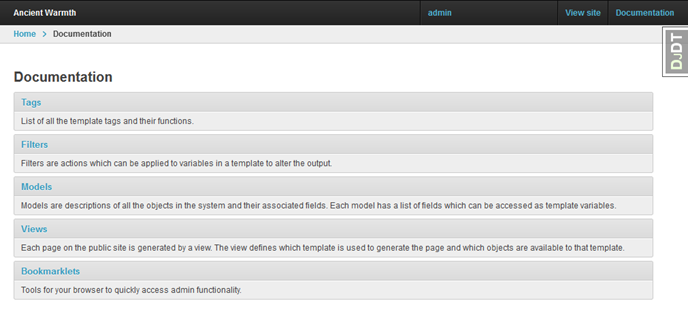
  </li>
</ul>]]></content><author><name>Mike Slinn</name></author><category term="Django" /><category term="Django-Oscar" /><summary type="html"><![CDATA[Sources of information about Django and django-oscar. I try to keep this page updated.]]></summary></entry></feed>